
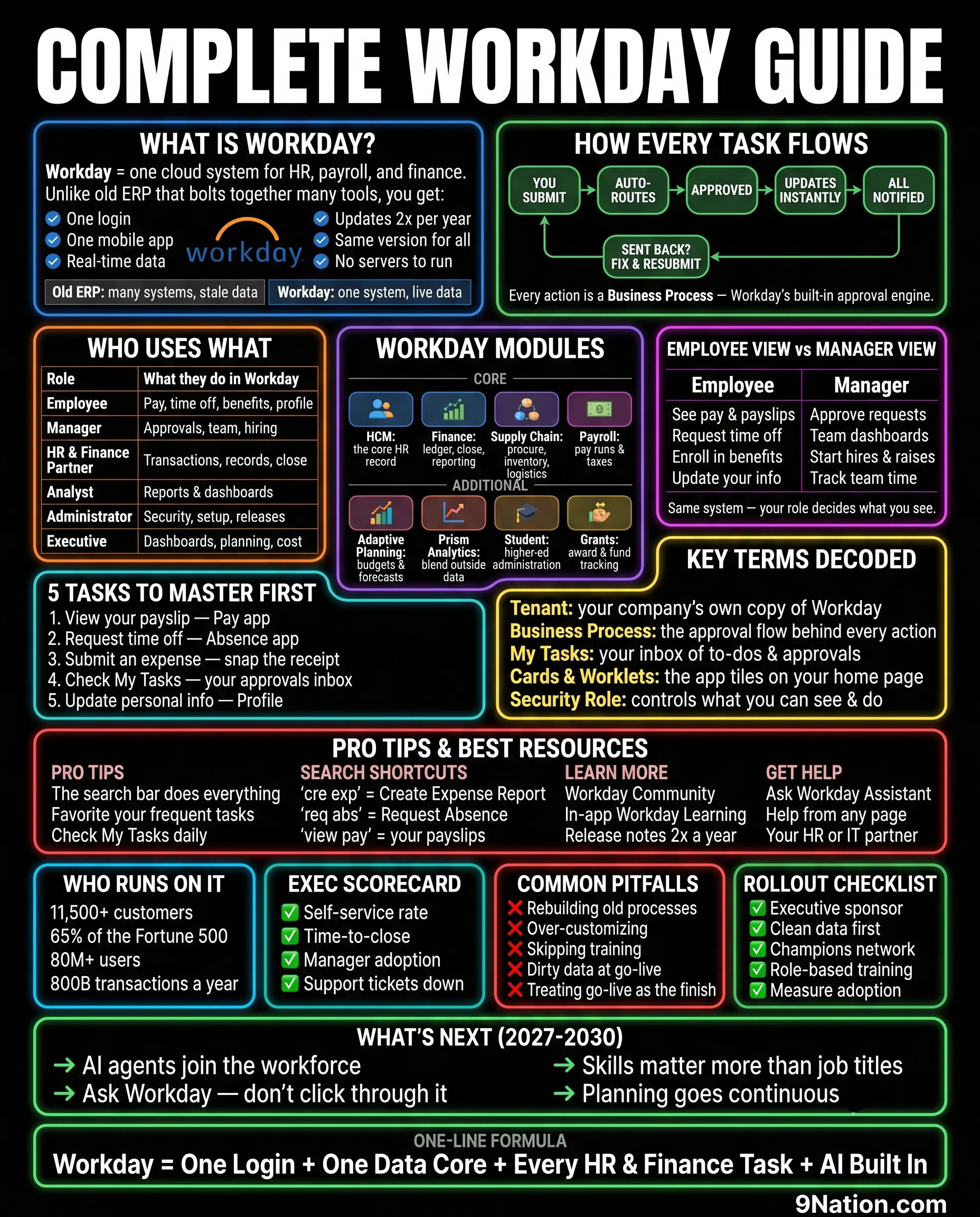
I have watched the same thing happen on every Workday program I have run. Someone joins in week three, sits through a design session, and hears tenant, business process, worklet, EIB, and supervisory organization inside the first ten minutes. They nod. They write nothing down. They spend the next month quietly guessing.
This page is the answer to that. It is the whole of Workday compressed into one reference: what the software is, how work actually moves through it, who touches what, and the vocabulary that makes a design session readable. The top half is for the person in week three. The bottom half is for the executive who has to approve a budget and wants to know what good looks like.
What Workday actually is
Workday is one cloud system for HR, payroll, and finance. That sentence sounds like marketing until you compare it against what most organizations are replacing. Old ERP is a set of products stitched together with interfaces, each with its own login, its own version, its own upgrade project, and its own copy of the employee record. Somebody reconciles those copies. Usually it is a person with a spreadsheet, and usually the spreadsheet is wrong.
Workday is one cloud system for HR, payroll, and finance.
- One login
- One mobile app
- Real-time data
- Updates twice a year
- Same version for everyone
- No servers to run
| Old ERP | Many systems, stale data |
| Workday | One system, live data |
The part that matters most is the last one on that list. Everyone runs the same version. You do not choose to sit out a release, and you cannot fork the code. That removes the upgrade project that used to eat a year of every ERP team's life, and it removes the option to customize your way out of a decision. Both of those are good news. Both of them also mean the design decisions you make during deployment stick.
How every task flows
This is the single concept worth learning before anything else. In Workday, nothing just happens. Every action runs through a business process, which is the built-in approval engine. Submitting an expense, hiring someone, posting a journal, changing a cost center: each one is a configured flow with steps, approvers, and conditions.
Sent back? Fix and resubmit, back to the start.
Every action is a business process, which is Workday's built-in approval engine.
Here is why this shows up in every design session. When someone says the approval is taking too long, they are not describing a training problem. They are describing a business process with too many steps in it, which somebody configured, which means somebody can change it. Once a team understands that, the conversation moves from complaining about the system to deciding who actually needs to approve a $40 expense. That is a business decision wearing a software costume, and it is most of what a Workday deployment really is.
Who uses what
Workday looks completely different depending on who logs in. Same tenant, same data, different world. This table is the one I put in front of a steering committee when they ask how many people need training and what kind.
| Role | What they do in Workday |
|---|---|
| Employee | Pay, time off, benefits, profile |
| Manager | Approvals, team, hiring |
| HR and Finance Partner | Transactions, records, close |
| Analyst | Reports and dashboards |
| Administrator | Security, setup, releases |
| Executive | Dashboards, planning, cost |
Most of your population is in the first row. They need twenty minutes and a good job aid. The rows that need real investment are the partners and the administrators, because those are the people who will hold the system up after the integrator's badge stops working. Programs that train the whole company evenly and then wonder why the help desk is drowning have usually spread their training budget in exactly the wrong shape.
The modules, and which ones you actually own
Core
| HCM | The core HR record |
| Finance | Ledger, close, reporting |
| Supply Chain | Procure, inventory, logistics |
| Payroll | Pay runs and taxes |
Additional
| Adaptive Planning | Budgets and forecasts |
| Prism Analytics | Blend outside data |
| Student | Higher education administration |
| Grants | Award and fund tracking |
Two practical notes. First, you are not buying a number of users, you are buying a set of products, and the ones on the second list are separate lines on the order form. Second, the module list is where scope quietly grows. A program that started as HCM and Payroll acquires Adaptive Planning in month four because someone in FP&A saw a demo. That is sometimes the right call, and the Adaptive Planning field guide covers the eight decisions it drags with it. It is never a free one, and it is why the Buying Guide spends a panel on what actually drives your price.
Employee view against manager view
- See pay and payslips
- Request time off
- Enroll in benefits
- Update your own information
- Approve requests
- Team dashboards
- Start hires and raises
- Track team time
Same system. Your security role decides what you see.
Security roles are the mechanism behind this, and they are the thing most often left until too late. Every program I have seen run into trouble at user acceptance testing had one of two problems: the roles were designed by IT without the business in the room, or they were designed last. Security is not a technical clean-up task. It is a set of decisions about who is allowed to see salary, and those decisions take longer than anyone plans for.
The five tasks to master first
| 1. View your payslip | Pay app |
| 2. Request time off | Absence app |
| 3. Submit an expense | Snap the receipt |
| 4. Check My Tasks | Your approvals inbox |
| 5. Update personal information | Profile |
Those five cover almost everything an ordinary employee will ever do. If your training program teaches these properly and nothing else, adoption will be fine. If it teaches forty tasks in a two-hour session, people will remember none of them and call the help desk instead.
Key terms decoded
- Tenant
- Your company's own copy of Workday.
- Business Process
- The approval flow behind every action.
- My Tasks
- Your inbox of to-dos and approvals.
- Cards and Worklets
- The app tiles on your home page.
- Security Role
- Controls what you can see and do.
Pro tips, and where to get help
- The search bar does everything
- Favorite your frequent tasks
- Check My Tasks daily
- cre exp for Create Expense Report
- req abs for Request Absence
- view pay for your payslips
- Workday Community
- In-app Workday Learning
- Release notes twice a year
- Ask Workday Assistant
- Help from any page
- Your HR or IT partner
The search bar deserves its own line. Workday is a search-first application pretending to be a menu-driven one. Typing three letters gets you where you are going faster than any navigation path, and the abbreviation trick is real: two short words separated by a space will find almost any task. Teach that on day one and you cut a measurable share of help desk volume.
How big this thing is
Figures published by Workday. Vendor-reported, and worth treating as scale context rather than as an independent benchmark.
Scale matters for one practical reason. On a platform this size, almost every problem you hit has been hit before by someone with your headcount in your industry, and the answer is usually sitting in Workday Community. Programs that treat Community as an afterthought end up paying an integrator to rediscover things that were already written down.
What an executive should actually watch
- Self-service rate
- Time to close
- Manager adoption
- Support tickets trending down
- Rebuilding old processes
- Over-customizing
- Skipping training
- Dirty data at go-live
- Treating go-live as the finish
- An executive sponsor with the authority to say no
- Clean data first, in the source system
- A champions network across the business
- Role-based training, not one session for everyone
- A way to measure adoption after go-live
Rebuilding your old processes inside Workday is the most expensive mistake on that list, and the hardest to see while it is happening. It looks like diligence. It feels like protecting the business. What it actually does is import every workaround your last system forced on you, at full price, into a system that did not need them.
What is coming next
- AI agents join the workforce
- You ask Workday rather than clicking through it
- Skills matter more than job titles
- Planning goes continuous
None of that changes what is on this page. It changes who does the clicking. The organizations that will get value out of agents are the ones whose data and processes are already in order, which is the argument for getting the basics right now rather than waiting for the next release to fix them. The AI Agents Guide covers what that actually looks like.
Where to go from here
- Customer counts, user numbers, Fortune 500 share and annual transaction volume: figures published by Workday. Vendor-reported.
- Module names, business process behavior, security roles, search shortcuts and support channels: Workday product documentation and in-product help.
- Practitioner observations on training shape, security timing and process rebuild are from the author's own programs, not from a published study.
Verified August 2026. Product names and release behavior change. Check current documentation before relying on any of this contractually.