← All insights

Workday implementation playbook

The Workday lessons you only learn the hard way

Workday is incredible software. However, an undisciplined deployment is the fastest way to blow a 7-figure budget and stall a corporate roadmap. After guiding years of ERP rollouts, I've seen the same 9 unforced errors derail otherwise brilliant projects. Here is the field-tested playbook on how to spot them, and fix them, before your parallel run hits a wall.

I'll say the obvious part first: Workday is one of the strongest platforms in the enterprise. But great software amplifies whatever you bring to it. After many years in ERP and a long run inside Workday deployments, these are the lessons that earned permanent space in my project charter. Each one cost someone real money, time and critical resources to learn.

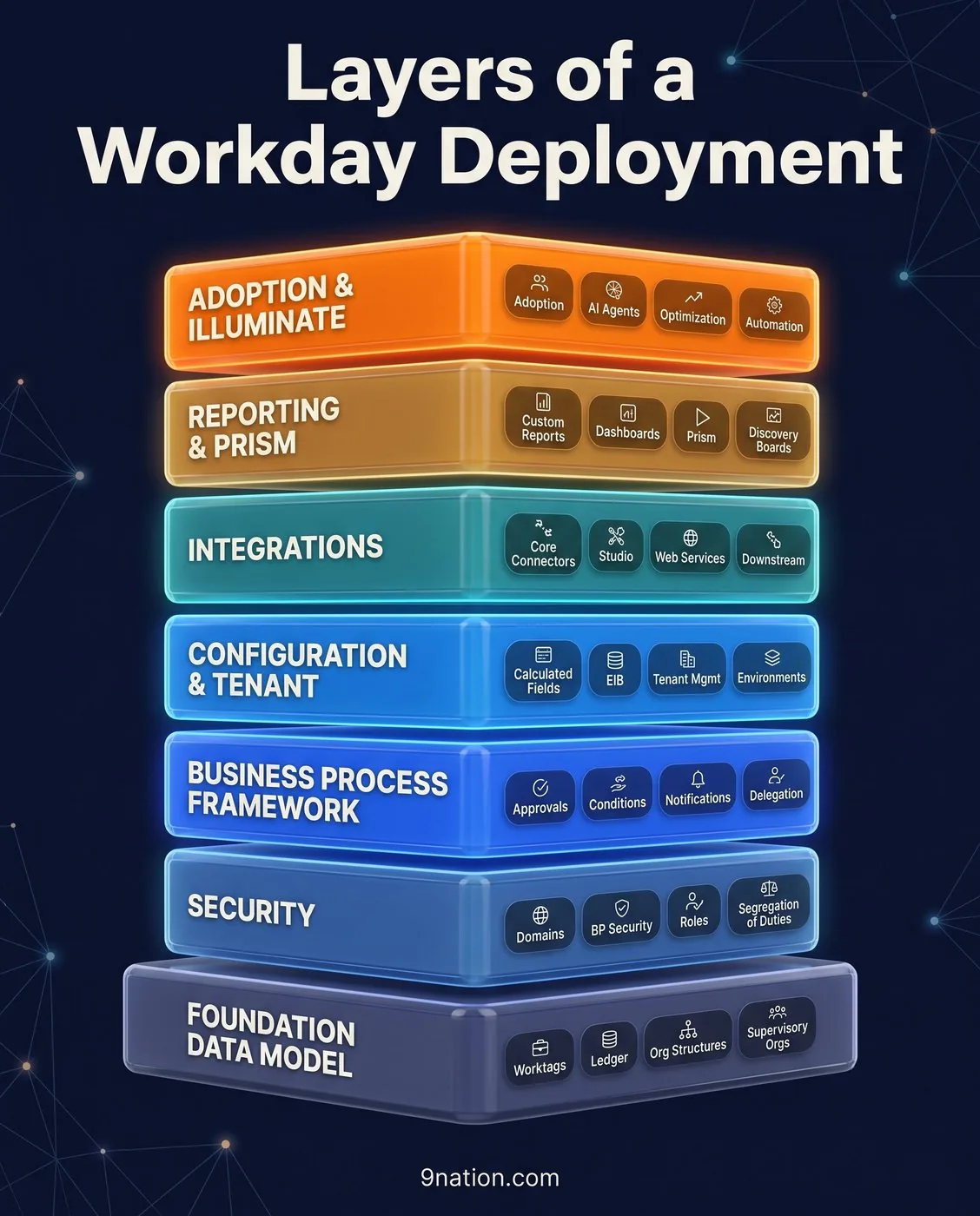
Layers of a Workday Deployment infographic: seven layers from the Foundation Data Model up to Adoption and Illuminate
A Workday tenant is a stack. Everything at the top, Illuminate included, inherits from the Foundation Data Model and the data beneath it.

Data1

Data conversion will hurt you, earlier and deeper than you planned.

Start conversion far earlier than feels reasonable. Treat it as a project inside the project, with its own dedicated owner and plan. Legacy data is always messier than discovery suggests.

On a recent program, we found 10% of "active" worker records were duplicates or carried termination dates that flatly contradicted payroll history. Incorrect worker or pay data creates genuine compliance and payroll-tax exposure: wrong filings, wrong withholdings, and real penalties.

You need a single, named data owner on the business side, not just a technical conversion lead. Technical teams can move data; only the business can vouch for it.

  • Run at least three mock conversions. Refuse to call data "go-live ready" until the final mock loads under 2% and Finance has reconciled control totals to the dollar.
  • When ownership is missing, conversion drifts into an endless loop of "that doesn't look right" with no one who can resolve it. Someone must be able to authoritatively answer, "Is this record correct?" Plan on your business being a part of the data process, ALWAYS.
Customization2

Adopt the platform. Don't bend it.

Workday ships two major feature releases a year, each with roughly a 5-week preview window to regression-test before it lands. That cadence is a gift, unless you've customized your way into a corner.

Every bespoke condition rule, clever integration, or faithfully recreated legacy quirk becomes something you must retest twice a year, indefinitely. At one client, roughly 80 "small" customizations added 3 weeks of regression effort to each release cycle. That is 6 weeks a year of a team's life spent maintaining decisions nobody remembered making.

Reserve true customization (such as Workday Extend or heavy custom integrations) for the rare places it creates genuine, competitive differentiation. Everywhere else, adopt the standard, let the platform carry the maintenance burden, and accept that it might sting a little up front.

Security3

Security is a design discipline, not a go-live task.

Workday's security infrastructure, including domain policies, business-process policies, and the complex ecosystem of role-based, user-based, and intersection groups, is incredibly powerful. However, it is completely different from legacy frameworks. Treat it as an afterthought, and you will pay for it during testing.

I once watched an End-to-End (E2E) testing cycle stall for a full week because a single role-based security group inadvertently exposed sensitive compensation data far wider than intended. Every test script involving pay had to pause.

Security touches everything. It determines what appears in an executive report, who can launch a business process, and what an automated integration is permitted to read. A weak security design undermines the entire build.

Design security roles alongside your business processes, never after them. Test them just as rigorously as any other configuration from day one.

Reporting4

Everyone underestimates reporting.

There is a quiet, near-universal assumption that your legacy reports will simply "come across." They will not. In the new system, reports must be completely rebuilt from scratch using custom reports, calculated fields, and Prism Analytics for heavier data blending. A report is no longer just a "report." It is a distinct design and build effort.

Start with an honest inventory. At one client, roughly 400 "absolutely critical" legacy reports collapsed to just 90 that anyone used once we audited the system run logs.

Give reporting and analytics its own dedicated workstream, its own requirements, and its own testing cycle. The week after go-live, executives won't ask if the workflows route correctly. They will ask where their numbers are. "We're still rebuilding that report" is not an answer you want to give the CFO.

Integrations5

Integrations are a program inside the program.

Almost every organization underestimates both the sheer volume and complexity of integrations. The clean "one system" narrative hides dozens of handshakes to benefits carriers, banks, time clocks, tax engines, and downstream applications.

On one program, initial discovery listed 50 integrations. The real number was closer to 90 once we mapped the real footprint across EIBs, Core Connectors, Workday Studio, and PECI for payroll. Every single integration requires a custom build, testing, error handling, and a fallback plan for the night it inevitably fails at 1:00 AM.

Inventory your ecosystem early, name a single business owner for each handshake, and test them with production-like volumes rather than a few sample records. Don't forget production monitoring and alerting. You want to find out an integration failed from your own dashboard, not from an angry vendor or a missed bank file.

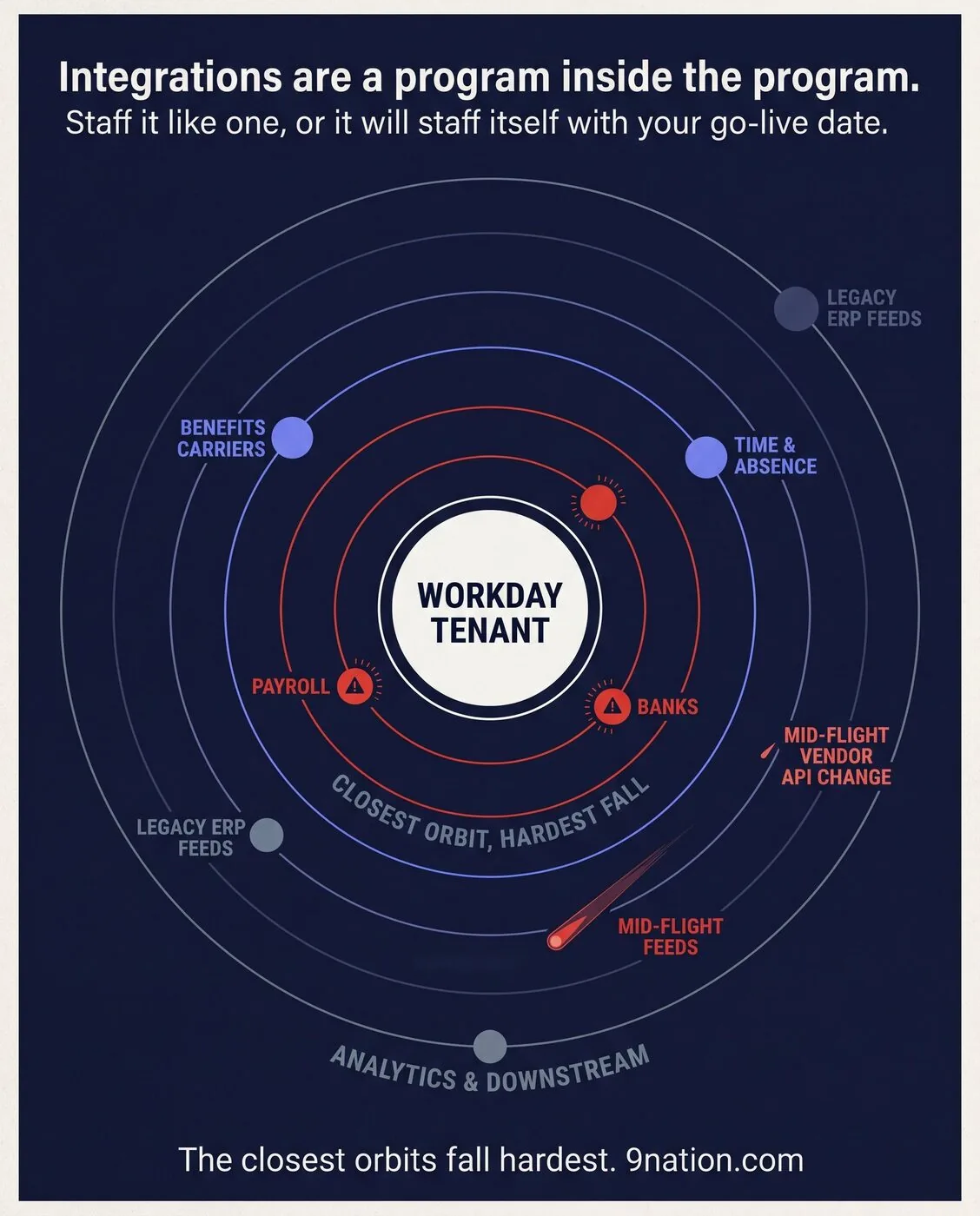
Orbit diagram of integrations circling a Workday tenant, closest orbits carrying the highest risk
The integration orbits. The closest ones fall hardest.

Adoption6

Adoption is won in change management, not configuration.

A beautifully configured tenant that is poorly adopted is just a failed project. Different audiences, including employees, managers, HR, and finance analysts, require vastly different training depths, formats, and timing.

Generic webinars delivered 3 months before launch accomplish almost nothing. This failure point scales dramatically in high-headcount or complex industries like Higher Education with students and faculty, or Healthcare with physicians and clinical staff.

Programs that succeed use role-based, hands-on enablement and targeted in-app guidance. One client that pushed aggressive manager self-service training before go-live cut HR's transactional ticket volume by roughly half in the first quarter.

Treat adoption communication as a sustained marketing campaign, not a one-time launch announcement. Adoption is the difference between a system people use and an expensive platform they route around.

Knowledge transfer7

Your SI is a partner, not a substitute for understanding.

A good System Integrator (SI) is worth every dollar, but you must always remember that they will eventually roll off.

The most painful post-go-live situations share one root cause. The client outsourced the fundamental understanding of the system alongside the build, completely skipping legitimate knowledge transfer. When a critical business process breaks in production months later, no internal team member can explain why it was configured that way in the first place.

Insist on active knowledge transfer starting in Week 1, not as a rushed closeout task. For every major functional pillar, develop an internal client owner who can explain the configuration unaided. When the SI hours taper off, your team owns the platform and the next decade of feature releases.

Sequencing8

Decide big-bang vs. phased deliberately, never by accident.

Standing up HCM, payroll, benefits, and financials in a single, massive cutover is highly seductive. It promises one change narrative, one major celebration, and one project timeline to close out.

A "big-bang" approach multiplies the blast radius because a single workflow or integration failure can ripple across every corporate function on Day 1. Phasing your rollout shrinks that immediate blast radius. However, it introduces temporary, throwaway integrations and drags the organization's change fatigue out over a longer period.

There is no universally right deployment sequence. The wrong way to decide is by accident, because the timeline looked clean on a slide. Make sequencing a risk-weighted, deliberate choice at the start, with the trade-offs explicitly signed off by the executives who will own the consequences.

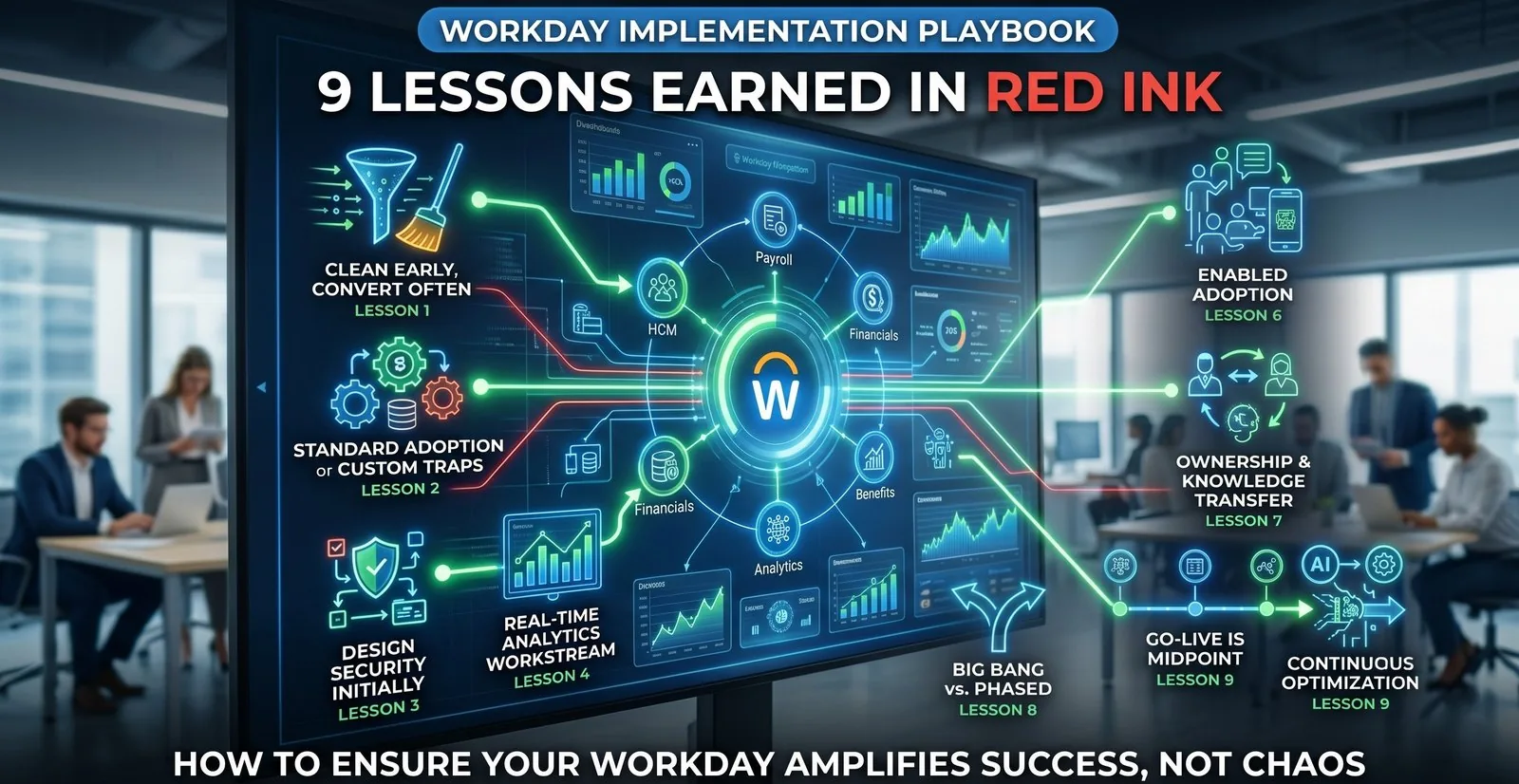
Nine lessons earned in red ink: data, customization, security, reporting, integrations, adoption, knowledge transfer, sequencing and hypercare, each wired to one Workday tenant
Nine lessons, every one of them wired to the same tenant.

Hypercare9

Go-live is the midpoint, not the finish line.

The corporate calendar often treats go-live as the end of the project. In reality, it is caught right at the halfway mark. Hypercare, stabilization, and your first true optimization cycle are where your massive financial investment starts paying back.

Workday evolves twice a year, most recently introducing a rapidly expanding set of Illuminate AI agents across HR and Finance. Because of this, maintaining system health is a permanent organizational capability, not a temporary project state.

The organizations that maximize their ROI stand up a dedicated Workday Center of Excellence (CoE) before go-live. Build the internal muscle to govern, regression-test, and continuously optimize before Day 1 of production. Everyone else ends up building that muscle in a panic during their first mandatory feature release, usually while something critical is on fire.

Before every kickoff

A pre-mortem I run before every kickoff

  • Data. Who owns conversion, and what's our error-rate target by mock load? Can we start cleanup activities now?
  • Customization. What standard are we tempted to break, and is it worth all the regression testing twice a year?
  • Security. Are roles being designed with the business processes, or bolted on later?
  • Reporting. What's the real list of reports people use, verified against run logs?
  • Integrations. Have we inventoried every handshake and named an owner for each?
  • Adoption. What adoption metric and critical KPIs will we watch in the first 30 to 60 days?
  • Sequencing. Is big-bang vs. phased a deliberate, signed-off decision?

I've packaged this exact framework into a downloadable Workday Deployment Readiness Checklist, a pre-formatted template you can bring straight into your next steering committee. Get the free checklist here, or message me on LinkedIn and I'll send it over.

None of the nine failures were technical

If there is a thread running through all nine, it's this: none of these failures are technical. They're failures of ownership, sequencing, and honesty about the state of the work. Great technology will faithfully amplify whatever discipline, or lack of it, you bring. Go in clear-eyed on these lessons and you'll spend your energy on the work that matters, instead of the fires you could have prevented in a workshop 6 months earlier.

Practitioners, what's the one lesson that earned permanent space in your charter? The best ones in this field are the lessons we share before someone else has to learn them the hard way, and I'd like to add yours to my list.

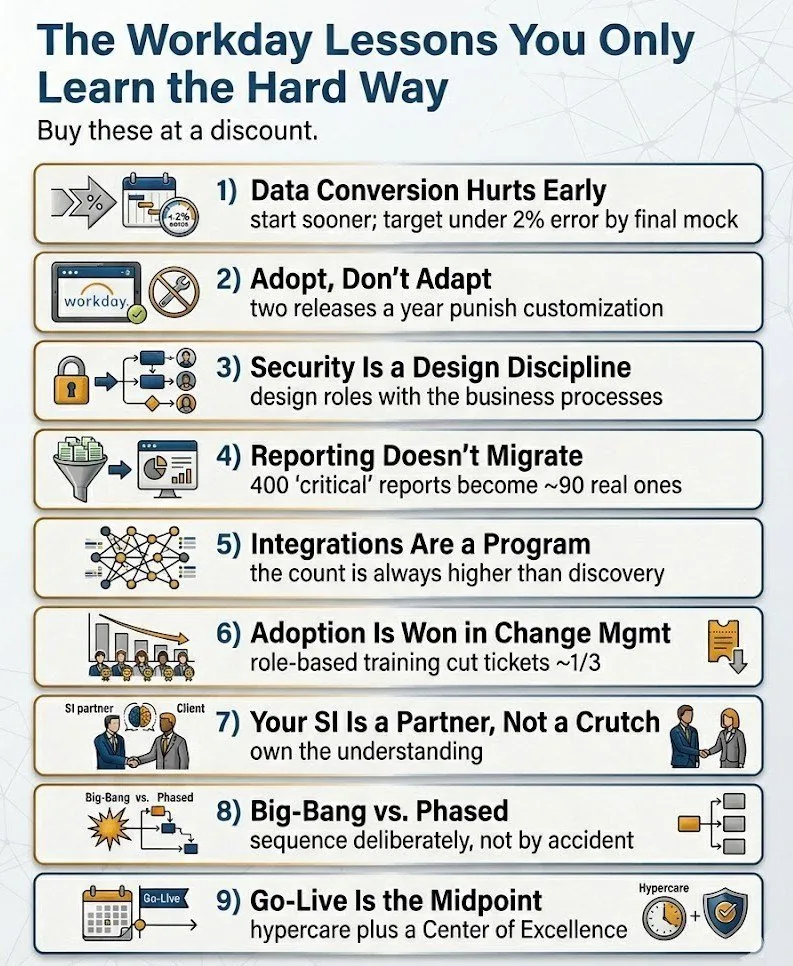
The Workday lessons you only learn the hard way: the nine lessons as a numbered list, each with the one line that proves it
The nine lessons, at a glance.
Complimentary 30-minute deployment review

Spotting these red flags in your own charter?

If you're staring down a kickoff, or mid-build and realizing your integration map or data migration is tracking toward a 2 a.m. crisis, let's look at your timeline, sequencing, and resource plan before production does it for you.