
Delivery mechanics · Conversion & integrations
Data conversion and integrations: the workstream that decides your go-live
The software you're buying is rarely the risk. The data going into it and the connections coming out of it are. Conversion and integrations sink more ERP go-lives than any other workstream, and they usually fail for management reasons.
Through 2027, more than 70% of recently implemented ERP initiatives will fall short of their original business goals. The largest study of big IT programs, from McKinsey and the University of Oxford, found they run 45% over budget and 7% over schedule on average while delivering 56% less value than promised. Poor data quality alone costs the average organization at least $12.9 million a year. When one of the largest public ERP programs on record hit its first operating milestone 22 months late, the audit named the effort to convert data from legacy systems as part of the reason.
- 70%+Recently implemented ERP initiatives that will fall short of their original business goals through 2027
- 45%Average budget overrun on big IT programs, McKinsey and the University of Oxford
- 56%Less value delivered than promised, same study
- $12.9MWhat poor data quality alone costs the average organization each year, at least
On most programs the software works. What fails is the pair of workstreams that decide whether it ever holds real data and talks to the systems around it: data conversion and integrations. They're the quiet middle of the project. They don't demo well, they get little executive airtime, and they're the first place a program borrows time from when it falls behind. Then they take the go-live date down with them.
This is the field guide I use on a live program, written for the client-side program leader. It's system agnostic. The examples lean on Workday and Oracle Cloud because that's where I've spent the most time, and the discipline is the same on SAP, Dynamics or anything else. Each area comes with notes from real engagements, fully anonymized, and one move that changes the outcome.
The one idea to hold onto
Both workstreams fail for management reasons: unclear ownership, wrong sequencing, no accountability for data quality, and testing that gets compressed until it proves nothing. Fix the management and the technology follows.
Week one
The two workstreams that decide the date
Every ERP program has a headline story: one system, cleaner processes, better reporting. That story hides how much of the work is plumbing. You're pulling decades of data out of systems people have forgotten how to explain, reshaping it to fit a new model, and rebuilding every handshake to the banks, carriers, tax engines and downstream applications that keep the business running. None of that shows up in a demo, but every piece of it is in play on cutover weekend.
Conversion and integrations belong together because they share a calendar and a failure mode. You can't test an integration properly until the data behind it is converted and stable, so the conversion schedule drives the integration schedule. Both also fail the same way. They get treated as technical tasks the System Implementer (SI) will handle, so nobody on the business side owns the outcome until the outcome is a problem.
The count that sets your real critical path is how many data objects you're converting and how many interfaces you're standing up. The number of modules you're deploying tells you far less. And the stakes sit in the tail: one in six large IT projects becomes a genuine black swan, with a cost overrun near 200%, the kind of number that can threaten the company itself. Conversion and integrations are where those tails get made.
The move
Put conversion and integrations on the program's critical path in week one, with their own lead, their own plan and their own status in every steering review. If they're buried inside a functional workstream, they're already losing.
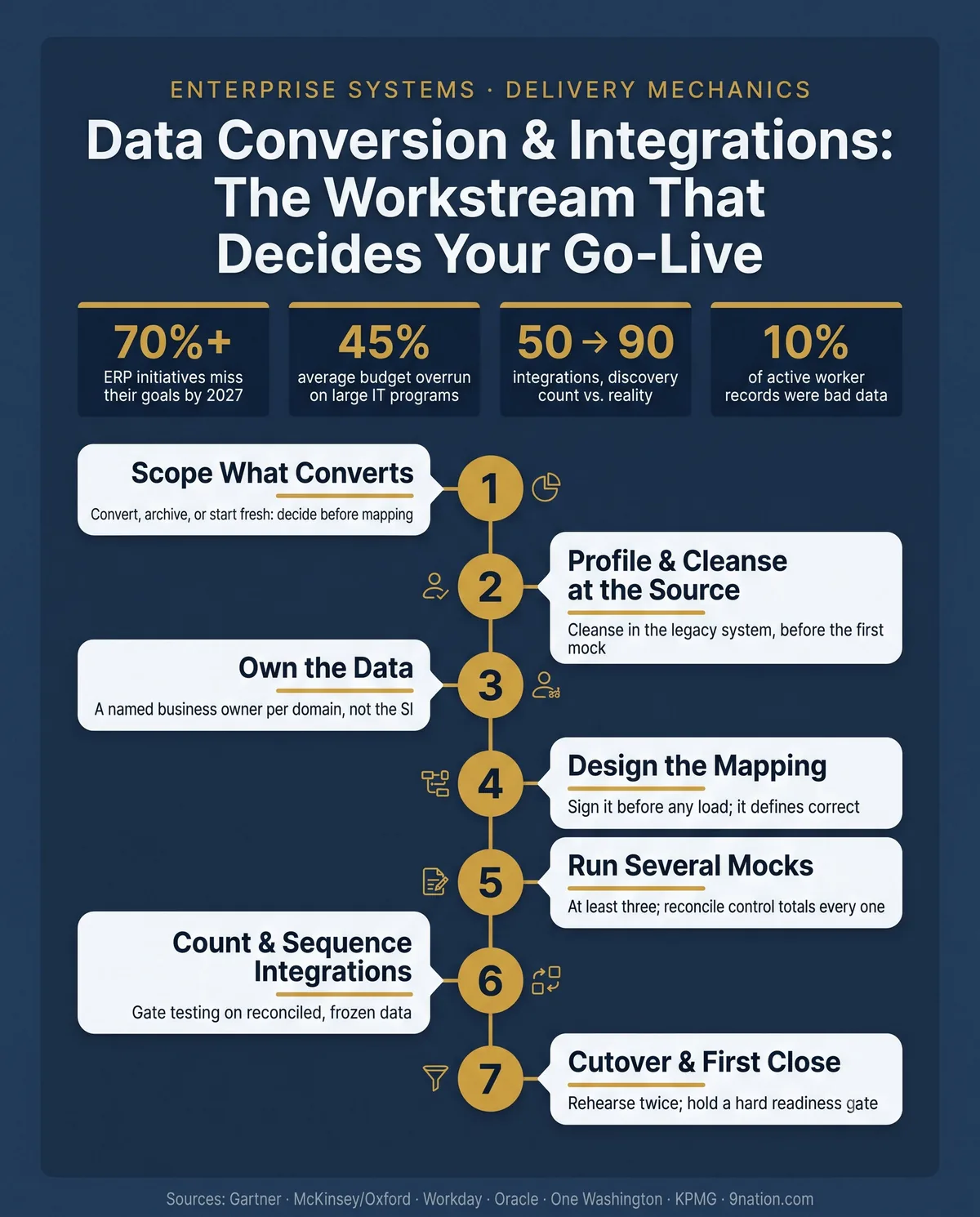
Decide what converts before you decide anything else
The first real decision in conversion is scope. It's a business decision dressed up as a technical one. You don't have to convert everything. Most programs convert far more history than the business will ever use, pay for it in schedule and risk, and then archive the legacy system anyway.
The cleaner default is to convert open balances and active master data and leave closed history where it sits, in a read-only legacy archive you can query when an auditor or a dispute requires it. History gets converted only where a law, a regulator or a live business process needs it in the new system.
Legacy data
- Convert open balances and active master data
- Archive closed history, read-only and queryable
- Start fresh where the legacy structure no longer fits
| Option | Timeline | Risk and cost | Prior years |
|---|---|---|---|
| Convert full history | Longest | Highest | Native trends on day one |
| Balances and active data only | Shortest | Lower | From the archive until history rebuilds |
Default to balances and active data, and let retention rules decide the exceptions.
The third bucket is start fresh. Some master data is better rebuilt clean in the new model, because the legacy structure no longer fits how the business will run. A redesigned chart of accounts, a rationalized set of cost centers or a cleaned supplier master is often worth building new. Archiving unneeded data before cutover costs you nothing either. It shrinks the volume you move during the go-live window, which shrinks the downtime and the risk on the one weekend where risk is most expensive.
Data quality is your job
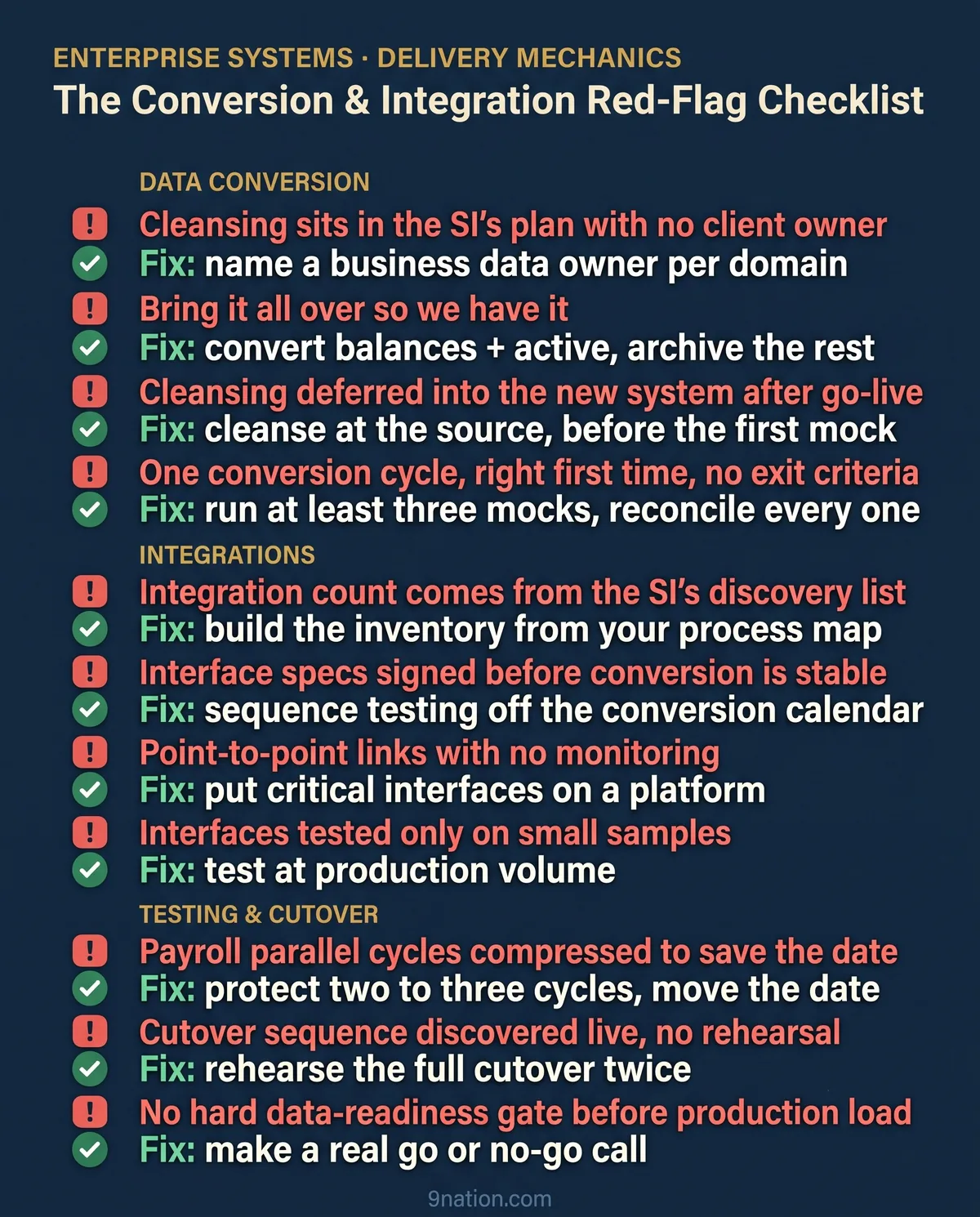
The implementation partner isn't responsible for cleaning your data. Hearing that early saves programs. They'll build the extracts, the mappings and the loads. They'll profile the data and flag what looks wrong. But they can't know that a cost center is dead, that two vendor records are the same company, or that a worker marked active left in March. Only the business knows that.
Independent advisors put it the way I wish every sponsor heard it on day one: your software vendors and implementation partners aren't responsible for your data, and if you hand them dirty data and assume they'll fix it, you're setting up the next failure.
- In the legacy system. The cleanest option, because it fixes the record everywhere it lives. Cleanse at the source whenever you can, before the data ever enters the conversion process.
- In the transformation rules. The fallback for when the legacy structure simply can't produce what the new system needs.
- After go-live, inside the new system. The last resort, and the one that quietly becomes permanent.
Profile first, because the risk in a conversion hides until it's expensive. Poor data quality usually surfaces late, as load failures in the target system at the worst possible moment, unless you profile the source early. Start cleansing before the first mock conversion and keep going through every cycle. Data decays while you work, and new bad records arrive every day the legacy system stays live.
Don't chase perfect, either. No organization needs perfect data or will pay for it. Set a target, measure against it and move.
Put a name on every data domain
The most common root cause of failing conversions is that no one person owns the data. Data governance has a clean model for this, with three roles.
| Role | Who | What they hold |
|---|---|---|
| Data owner | A senior business stakeholder | Accountability for a domain, and sign-off authority |
| Data steward | The practitioner for that domain | Day-to-day quality, the mapping rules, and validating the converted results |
| Data custodian | The technical role, which is the SI | The extract, transform and load mechanics |
The SI is your custodian. It's neither your owner nor your steward. Accountability for whether the data is correct and fit for purpose sits with your people and can't move to the vendor.
When that structure is missing, the work keeps going and fails quietly. Every team assumes another team has the validation rule. The load fails, and three groups each explain why it isn't theirs. Naming one accountable owner per domain, with a date on every open item, ends that pattern faster than any tool.
Design the mapping before you load anything
Conversion is reconciliation. The mapping specification is where you decide what correct means, and a load built on a vague mapping produces defects you can't even diagnose. Every field in the new system needs a decision about where its value comes from, and there are only a few patterns.
Direct move The value maps straight across, maybe reformatted.
Translation rule Legacy data that needs logic before it fits.
Defaulting The new system requires a field the legacy system never captured, so the business defines a valid default.
Crosswalk Handles the one-to-many and many-to-one cases.
The hard cases are the ones with no clean source. A required target field with no legacy equivalent needs a default the business owns, because a developer's guess is what you'll get otherwise. Duplicate values across legacy systems force a decision about the system of record before anything loads. Get these decisions in writing, owned by the steward, and you have a mapping you can reconcile against. Skip them and you have a load that worked and data nobody trusts.
Two details pay off later. Build crosswalk tables for any re-keyed identifier, such as a new vendor ID, so users can still tie a new record back to the old one after go-live. And bake validations into the mapping spec itself, including dependency checks like loading vendors before the purchase orders that reference them.
The move
Treat the source-to-target mapping as a signed design artifact: one owner per object, and every defaulting and system-of-record decision made by the business in writing before the first load. The mapping is the contract for what "converted correctly" means.
Mock conversions: run several, reconcile every one
A single right-first-time conversion is a named program risk in its own right. The practice that de-risks it is iterative: run several mock conversions in production-like environments, and keep running them until the results say the data and the tooling are ready. At least one mock should run on production-scale data, in both quality and volume, so the volume and performance problems turn up before cutover.
A mock that completes has only cleared the first hurdle. It still has to prove three things.
- Reconciliation reports tie the data extracted from legacy to the data loaded in the new system at a control-total level.
- Item-level validation checks individual records by hand. It's the exit criterion for moving on.
- End-to-end process validation runs a real business process, requisition to payment or hire to pay, on the converted data.
Set entry and exit criteria for every cycle and run a lessons-learned after each one to attack root causes. On my programs the bar is concrete: at least three mock conversions, critical defects held to near zero, and Finance reconciling control totals to the dollar before any data is called go-live ready. Under 2% error on the final mock is the floor.
The move
No mock passes until control totals reconcile, item-level validation clears and every critical defect is closed. Publish the exit criteria before the cycle starts so nobody can redefine done under deadline pressure.
Nearly every program underestimates its integration count
The application estate around a modern ERP is enormous and mostly disconnected. The average organization now runs close to 957 applications, and only about 27% of them are connected to each other. So when a program starts mapping the systems the ERP has to talk to, the universe is large and most of it was never integrated before.
Real programs carry the weight of this. On public-sector ERP work, one Oracle Cloud program delivered more than 100 integrations and one Workday program delivered 64. Dozens to a hundred-plus interfaces is normal for an enterprise deployment. A simple taxonomy keeps the inventory honest:
| Direction | Typical feeds |
|---|---|
| Inbound | Time, benefits enrollments, bank returns |
| Outbound | Payroll to the provider, GL to the bank, files to tax and reporting |
| Bidirectional | CRM, procurement, EDI |
Every interface also has two owners, one on each side, which makes it a scheduling risk before it's a technical one. An interface is only as ready as the slower of its two sides, so confirm the counterpart's availability and test schedule before you commit your own dates. The interfaces that slip are rarely the hard ones. They're the ones where the other side was never asked.
The move
Build the integration inventory yourself, from the process map, instead of inheriting the SI's discovery list. Rate every interface by criticality and by cutover timing, and run the close-critical ones (payroll, bank, tax, GL) as their own mini projects with named owners on both sides.
Pick an integration architecture on purpose
How you connect systems is a decision with a long tail. Point-to-point wires each system straight to each other system. It's fast and cheap for a single connection and a trap at scale, because the number of possible connections grows with the square of the systems. Five systems can have ten links. Twenty can have 190.
Middleware, or an integration platform as a service (iPaaS), connects each system once to a central platform that handles routing, transformation, monitoring and error handling. API-led connectivity is the modern layered form of the hub. It organizes interfaces into reusable system, process and experience layers, so a connection built once is consumed many times.
The market has voted with its budget. iPaaS is the largest segment of the integration middleware market, with revenue past $9 billion in 2024 and a forecast beyond $17 billion by 2028. A platform still isn't right for every program. If you're carrying dozens of interfaces you'll maintain for years, though, hand-built point-to-point connections almost always lose to a hub on total cost once you count monitoring, error handling and the day someone has to change a field. Keep point-to-point for the genuinely simple and stable, and put the close-critical, high-volume interfaces on a platform with real error handling and monitoring.
Test ladder
Sequence the build and test against the conversion calendar
You can't reliably test an integration on data that isn't converted and stable yet. Test an interface against unconverted or unstable data and you generate noise: when a test fails, you can't tell whether the fault is the data, the mapping or the interface logic. That's why data reconciliation after conversion is an entrance criterion for the next test phase. The same discipline demands a configuration freeze. If functional teams keep changing config underneath you, you lose the ability to analyze against consistent data.
- Unit
- String or thread
- System integration testing (SIT)
- End-to-end and user acceptance testing (UAT)
The test ladder is standard and worth respecting in order, with SIT run in a production-like environment. Where a partner system isn't ready, use stubs and mocks so the flow can proceed. For payroll, parallel testing is its own gate: run the new system against legacy for several cycles and research every variance to root cause. My rule is simple. If there isn't time left for two or three real parallel cycles, you move the go-live date. You don't shave the parallel testing.
Two testing details save cutover weekends. Test at production volume, because an interface that clears on the 200 records of early SIT can still fail on 200,000. Then run a connectathon, where both sides of each close-critical handshake exercise the real exchange once each side is stable.
Environments are the enabler most programs under-plan. Workday's own model is a good illustration: separate implementation tenants for testing, a weekly-refreshed sandbox, and a preview tenant that gets feature updates ahead of production. A typical program runs four to ten or more active implementation tenants.
Cutover
Cutover is where conversion and integrations pay off or come due
Treat every interface at cutover as a small switch with its own plan.
- Stop the old feed.
- Capture and reconcile the final file.
- Start the new feed.
- Validate the first file with control totals.
- Confirm error handling and replay work.
Rehearse the full cutover at least twice, once early to prove sequencing and once late to simulate the real timing and staffing, and update the runbook after each. Stand up a command center with a dedicated integration lead alongside conversion, security and business readiness, so no interface is orphaned in the one window where orphaning is fatal.
Before the production load runs, hold a real gate. Confirm that legacy cleansing reached the agreed level, that the conversion packages all run clean and that configuration is loaded. Then make the go or no-go decision. The production conversion introduces nothing new. It's the final mock reconciliation package run one more time against production, which is exactly why the mocks had to reconcile first.
First close
Then comes the part finance feels. Converted balances have to tie out, subledgers have to reconcile to the general ledger, and auditors will re-perform reports to confirm the numbers survived the move. Don't assume your legacy reconciliations carry over unchanged. A new finance data model can change which reconciliations even exist.
Hypercare
In hypercare, watch interface failure rates and exception-queue aging every day. Know your rollback reality up front, because rollback is rarely a clean switch back.
Workday and Oracle
Different tools, identical management job
The platforms give you different tools. The management job is the same on both: iterate the loads in dedicated environments, reconcile against control totals and own the data yourself.
| The job | On Workday | On Oracle Cloud |
|---|---|---|
| Loading data | Enterprise Interface Builder (EIB), the no-code, spreadsheet-driven tool business users run for bulk loads | File-Based Data Import (FBDI) for bulk conversion: fill an Oracle-provided template, generate the file, load it through interface tables. ADF Desktop Integration (ADFdi) gives live create-and-update from inside Excel for smaller volumes and correction. |
| Complex and recurring integrations | Workday Studio for orchestrated integrations with real error handling, and Core Connectors, the configurable, Workday-maintained templates for common patterns | Oracle Integration Cloud (OIC), which can transform source files into FBDI format and invoke the import job |
On Workday
Workday separates environments deliberately. Production is the gold copy. Sandbox is a weekly refresh of production. A preview tenant receives feature updates ahead of production so you can test integrations against the next release, and implementation tenants are on-demand replicas you spin up for configuration and third-party integration work, with a typical program running four to ten or more. The tools change nothing about ownership. The EIB will load whatever you give it, correct or not.
On Oracle
Oracle Cloud runs the same play with different names, with FBDI as the primary bulk conversion vehicle. On both platforms, conversion iterates through the test cycle, a conference room pilot (CRP) validates configuration on real data early, and UAT confirms readiness after configuration is frozen.
On most failed programs, the software did what it was sold to do. What broke was the data going into it and the connections coming out of it, and both broke for reasons decided months earlier: who owns the data, what actually converts, how many interfaces there really are, and whether testing got the time it needed.
The software was never the risk
Those are management decisions, and they're yours to make. Make them early, put a name on every one, and hold the sequence when the pressure comes. Do that and cutover is the calmest weekend of the program, because by then it's just the last mock, run one more time, on data you already trust.
Sources. External figures synthesize public research and documentation from Gartner, McKinsey and the University of Oxford, the U.S. GAO, Workday, Oracle, MuleSoft (Salesforce), Infosys, Umbrex, KPMG, Bloor Research, Panorama Consulting, and the State of Washington One Washington program. Field examples are drawn from real, fully anonymized enterprise programs. This article is general guidance, not legal or accounting advice.
Score your conversion across nine areas before the window opens.
A pre-cutover readiness checklist across all nine areas, plus a go-live quick reference: the common pitfall, the better move, and why it matters. Built to keep beside your cutover plan.
Put independent eyes on your conversion plan.
If your go-live rides on data conversion and dozens of integrations, a candid review of the plan before cutover is the cheapest insurance you'll buy.