
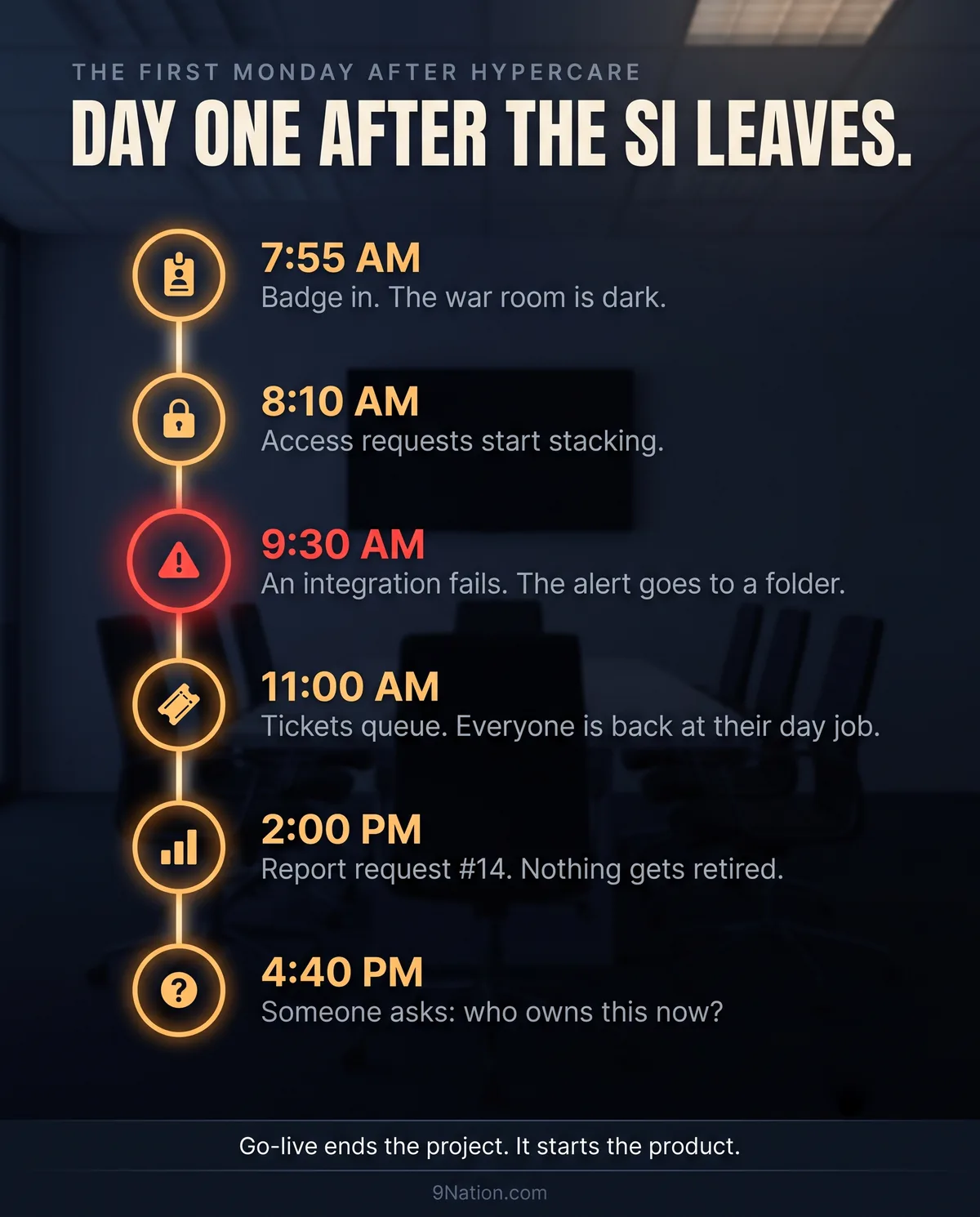
Every deployment guide in the world ends at go-live. Every conference talk ends at go-live. Then the project team disbands, the integrator's badges stop working, and four people who have never met each other formally are quietly responsible for a platform that runs payroll for the entire organization.
That handover is where more value gets lost than anywhere else in the lifecycle, and it gets lost slowly enough that nobody notices for about nine months. This page is what should have been handed over on day one.
The year-one invoice the quote never showed
The implementation quote ends at go-live plus hypercare. Year one does not. These are the cost lines that start the day the SI leaves, and where each one hides when it is not budgeted. Sizing depends on headcount, module footprint, and integration count, which is exactly why it belongs in the business case and not in a footnote.
| Cost line | What it actually is | Where it hides when unbudgeted |
|---|---|---|
| The run team | Named owners for security, integrations, reporting, and each functional area | Borrowed hours from people with day jobs, until they burn out or leave |
| AMS or partner retainer | Overflow capacity and deep configuration expertise on call | Emergency T&M engagements at rack rate, bought mid-crisis |
| Release testing | Five weeks of preview testing, twice a year, every year | Untested releases shipping to production, and the incident bridge after |
| Integration monitoring | A person, not a folder, watching every critical interface daily | The far end of the interface: the carrier, the bank, the agency, finding it for you |
| Report estate management | Ownership, naming standards, and retiring more than you build | A catalog of hundreds of near-duplicates and a rescue engagement to untangle it |
| Access governance | Scheduled reviews of who can see and do what | The audit finding, and the remediation project it triggers |
The honest framing for the steering committee: this is not new money. It is the tail of the money already approved, and cutting it does not save the cost. It moves the cost into year two and marks it up.
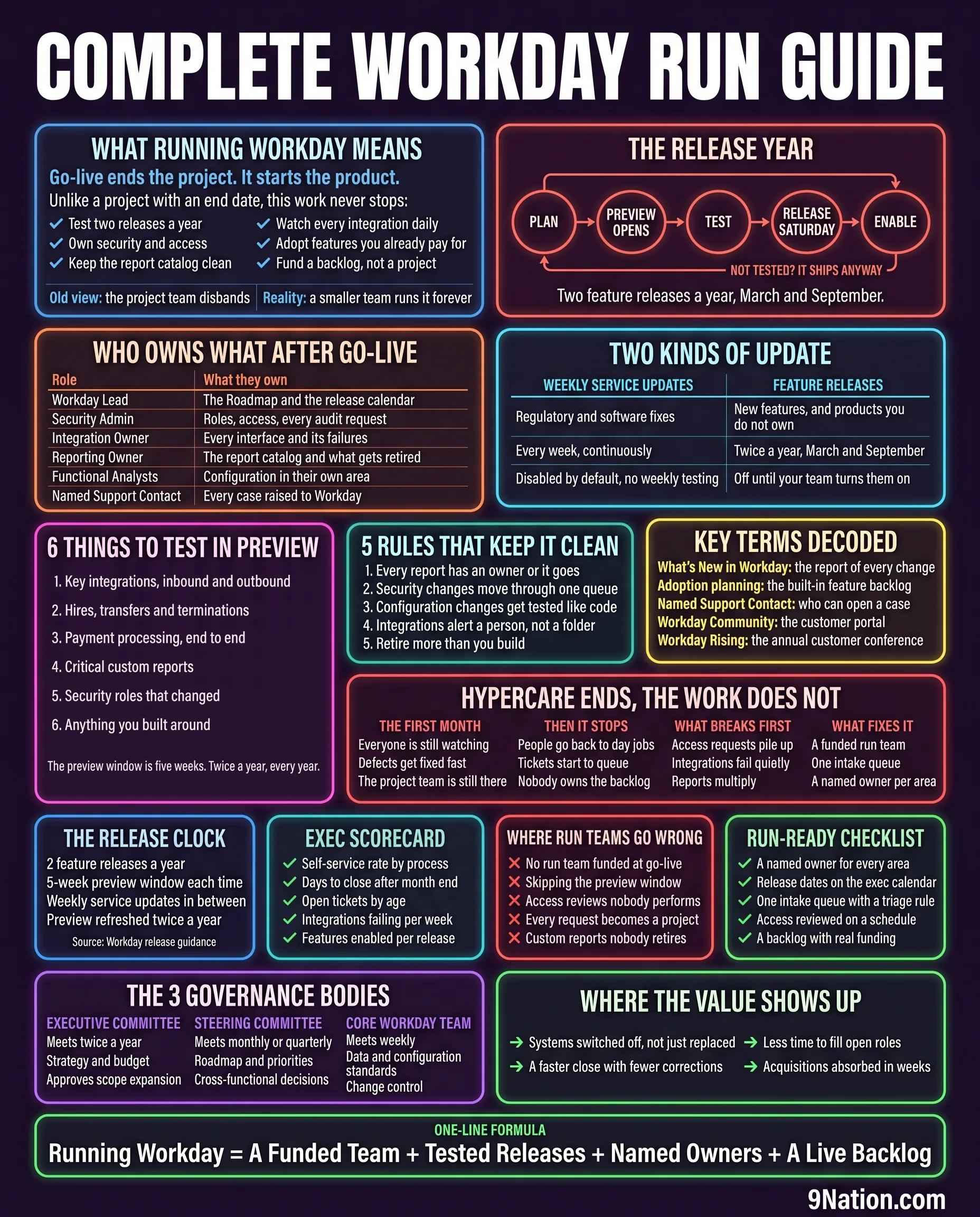
What running Workday means
Go-live ends the project. It starts the product.
Unlike a project with an end date, this work never stops:
- Test two releases a year
- Own security and access
- Keep the report catalog clean
- Watch every integration daily
- Adopt features you already pay for
- Fund a backlog, not a project
| Old view | The project team disbands |
| Reality | A smaller team runs it forever |
The fifth item is the one with real money attached. You are paying for the whole platform whether or not you use it, and features arrive switched off. Every release you skip is capability you bought and left in the box.
The release year
Not tested? It ships anyway.
Two feature releases a year, March and September.
This is a rhythm, not a series of events, and treating it as a rhythm is what separates run teams that cope from run teams that firefight. Put both release Saturdays and both preview windows on the executive calendar twelve months out. They do not move for you.
Who owns what after go-live
| Role | What they own |
|---|---|
| Workday Lead | The roadmap and the release calendar |
| Security Admin | Roles, access, every audit request |
| Integration Owner | Every interface and its failures |
| Reporting Owner | The report catalog and what gets retired |
| Functional Analysts | Configuration in their own area |
| Named Support Contact | Every case raised to Workday |
Six roles, and on most organizations under about 5,000 people they are not six people. They are three people wearing six hats, which is workable as long as the hats are explicitly assigned. What does not work is leaving them unassigned and assuming the person who happens to notice will handle it. Integrations in particular fail quietly, and quiet failures with no named owner are how a payroll interface stops running for eleven days before anyone asks.
Two kinds of update
| Weekly service updates | Feature releases |
|---|---|
| Regulatory and software fixes | New features, and products you do not own |
| Every week, continuously | Twice a year, March and September |
| Disabled by default, no weekly testing | Off until your team turns them on |
Both columns arrive mostly switched off. Workday's own release guidance says weekly service updates are disabled by default and feature release items are mostly disabled by default, so teams can test and enable them later. The release does not change your system. You do. That flips the risk: the thing to worry about is not a bad release breaking production, it is a growing pile of paid-for capability that nobody ever turned on.
Six things to test in preview
- Key integrations, inbound and outbound
- Hires, transfers and terminations
- Payment processing, end to end
- Critical custom reports
- Security roles that changed
- Anything you built around
The preview window is five weeks. Twice a year, every year.
The first four come straight from Workday's own release preparation guidance, which names key integrations, key business processes such as hires, transfers and payment processing, and critical custom reports. The last two are the practitioner additions, and they are the ones that catch people. Security roles change shape between releases more often than anyone expects, and anything your team built around a specific behavior is exactly the thing a release will quietly alter.
Five weeks sounds generous. It is not, once you account for the fact that the same people doing the testing are also running month-end.
Five rules that keep it clean
- Every report has an owner or it goes
- Security changes move through one queue
- Configuration changes get tested like code
- Integrations alert a person, not a folder
- Retire more than you build
Rule five is the one that keeps a tenant usable at year five. Report catalogs grow without limit unless somebody is actively removing things, and a catalog of 400 reports where 90 are actually used is worse than useless: it makes people distrust every number in the system because they cannot tell which version is the real one. I have watched a reporting cleanup collapse 400 reports down to 90 and free up more analyst time than any feature that shipped that year.
Rule four sounds trivial and is not. An integration failure that emails a shared mailbox is an integration failure nobody sees. Route it to a person, with an escalation if it is not acknowledged.
Key terms decoded
- What's New in Workday
- The report of every change in a release.
- Adoption planning
- The built-in feature backlog.
- Named Support Contact
- Who is allowed to open a case.
- Workday Community
- The customer portal.
- Workday Rising
- The annual customer conference.
Hypercare ends, the work does not
- Everyone is still watching
- Defects get fixed fast
- The project team is still there
- People go back to day jobs
- Tickets start to queue
- Nobody owns the backlog
- Access requests pile up
- Integrations fail quietly
- Reports multiply
- A funded run team
- One intake queue
- A named owner per area
Read those four columns left to right and you have the eighteen months after most go-lives. The failure is not dramatic and there is no incident to point at. Service just degrades, one unowned request at a time, until somebody senior asks why the system everyone fought for is worse than the one it replaced.
The fix is boring and it works. Fund the run team as a permanent line before go-live, not as a conversation you have once the complaints start. A run team argued for after the fact is always argued for from a position of failure.
The release clock
Source: Workday release guidance and release best practices.
The three governance bodies
- Meets twice a year
- Strategy and budget
- Approves scope expansion
- Meets monthly or quarterly
- Roadmap and priorities
- Cross-functional decisions
- Meets weekly
- Data and configuration standards
- Change control
Most organizations keep the steering committee running for a few months after go-live and then let it lapse, which leaves the core team making roadmap decisions with no forum to escalate into. Keep all three, at a lighter weight. The executive committee meeting twice a year is a low price for having somewhere to take a funding argument that is not a surprise.
- Self-service rate by process
- Days to close after month end
- Open tickets by age
- Integrations failing per week
- Features enabled per release
- No run team funded at go-live
- Skipping the preview window
- Access reviews nobody performs
- Every request becomes a project
- Custom reports nobody retires
- A named owner for every area
- Release dates on the executive calendar
- One intake queue with a triage rule
- Access reviewed on a schedule
- A backlog with real funding
Features enabled per release is the metric almost nobody tracks and the one that best predicts whether you will get value out of the platform. It is a direct measure of whether you are using what you are paying for. If the number is zero two releases running, the run team is underfunded and you now have evidence rather than a feeling.
Where the value shows up
- Systems switched off, not just replaced
- A faster close with fewer corrections
- Less time to fill open roles
- Acquisitions absorbed in weeks
The first one is the honest test of a program. If the legacy system is still running because one department could not be moved, you did not replace anything, you added something. Decommissioning is where the business case actually pays out, and it is almost always scheduled for after go-live and then never funded.
Where to go from here
- Two feature releases a year in March and September: Workday release guidance, corroborated by published customer release calendars. 2026R1 went live on March 14, 2026.
- The five-week release preparation window and the twice-yearly sandbox preview refresh: Workday release best practices guide.
- Weekly service updates disabled by default, and feature releases mostly disabled by default: Workday release best practices guide, in Workday's own wording.
- What to test in preview, namely key integrations, key business processes and critical custom reports: named directly in the same guide. Security roles and custom-built extensions are practitioner additions.
- The three governance bodies and their cadences: Workday release best practices guide and support team governance model.
- Value outcomes, namely decommissioned systems, a faster close, time to fill and acquisitions absorbed: listed by Workday as KPIs that leading customers track. Reworded here rather than quoted.
Deliberately excluded: any fixed hypercare duration in weeks, run-team headcount ratios, application management pricing, cost-per-employee support benchmarks, and percentage-of-features-adopted statistics. Every version of that last one in circulation traces back to a vendor selling adoption services.