
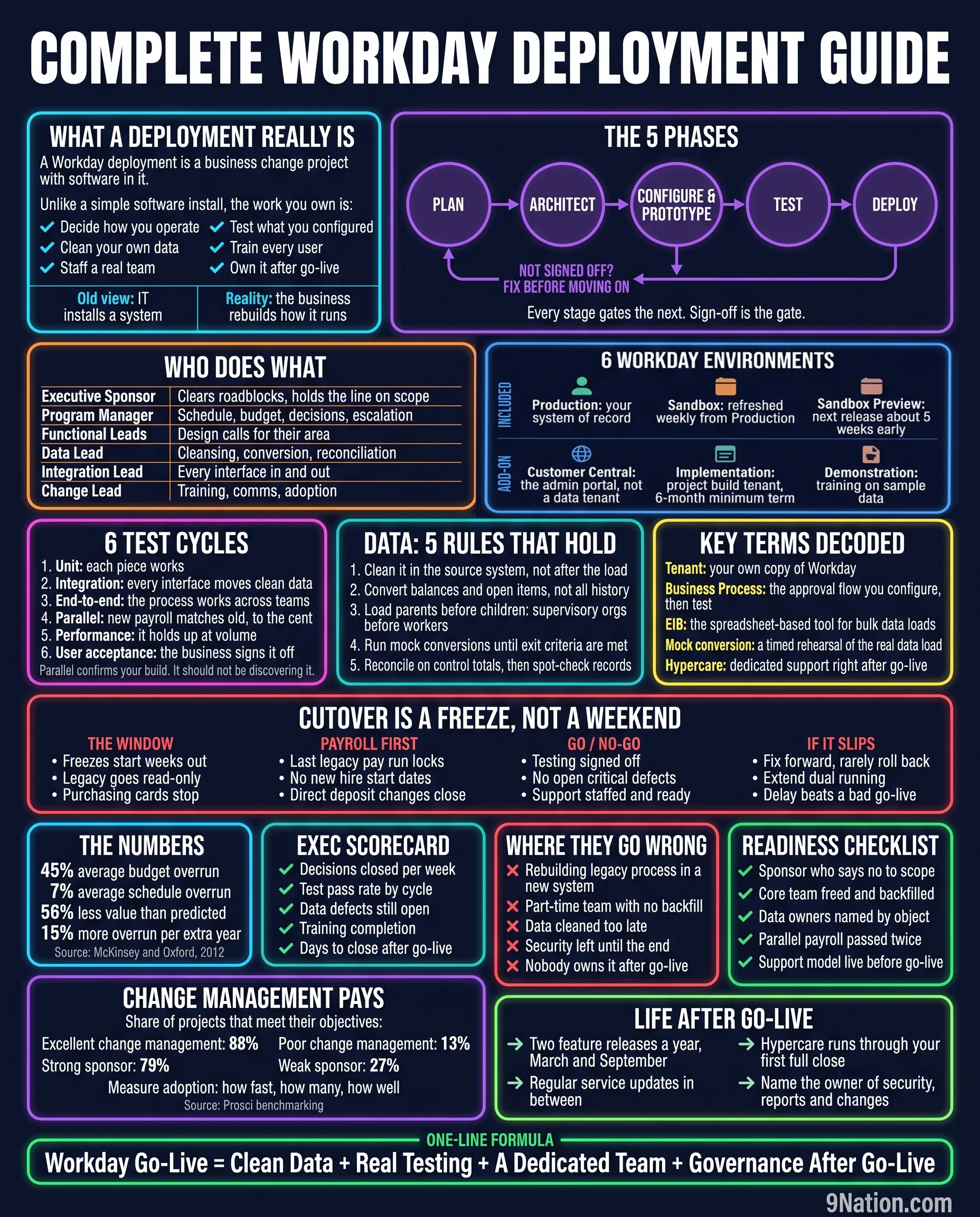
The most expensive misunderstanding on any Workday program is the one that happens before it starts. Someone decides this is an IT project. Budget gets set on that basis, the team gets staffed on that basis, and eighteen months later the program is over budget and the finished system looks a lot like the old one with a nicer login page.
It is not an IT project. It is a business change project with software in it, and almost everything on this page follows from that one sentence.
What a deployment really is
A Workday deployment is a business change project with software in it.
Unlike a simple software install, the work you own is:
- Decide how you operate
- Clean your own data
- Staff a real team
- Test what you configured
- Train every user
- Own it after go-live
| Old view | IT installs a system |
| Reality | The business rebuilds how it runs |
Every item in that list is yours. Not the integrator's. They will help with all six and do the heavy lifting on some, but if your organization has not decided how it wants to operate, no integrator can decide it for you, and the ones who try will decide it in whichever direction generates the most change orders.
The five phases
Not signed off? Fix before moving on.
Every stage gates the next. Sign-off is the gate.
The gate is the part that gets quietly abandoned. Programs run late, the next phase is already resourced, and someone decides to start configuration while three architecture decisions are still open. It always feels like the pragmatic call. It is how you end up rebuilding in month nine.
Who does what
| Role | What they own |
|---|---|
| Executive Sponsor | Clears roadblocks, holds the line on scope |
| Program Manager | Schedule, budget, decisions, escalation |
| Functional Leads | Design calls for their area |
| Data Lead | Cleansing, conversion, reconciliation |
| Integration Lead | Every interface in and out |
| Change Lead | Training, communications, adoption |
These are six client-side roles, and this table is the staffing conversation in one place. Name a person against each row before kickoff. If a row has no name, or has a name attached to someone doing this on top of their day job with no backfill, that is where your program will break, and you already know it on day one.
Six Workday environments
Included
| Production | Your system of record |
| Sandbox | Refreshed weekly from Production |
| Sandbox Preview | The next release, about five weeks early |
Add-on
| Customer Central | The administration portal, not a data tenant |
| Implementation | Project build tenant, six-month minimum term |
| Demonstration | Training on sample data |
Two things to take from this. Sandbox refreshes weekly from production, which means anything you park there gets overwritten on a schedule, and every program loses work to that at least once. And the implementation tenant is an add-on with a minimum term, which matters if your timeline slips: a six-month build tenant against a program that takes eleven months is a conversation you want to have at contract signature rather than in month seven.
Six test cycles
- Unit: each piece works
- Integration: every interface moves clean data
- End-to-end: the process works across teams
- Parallel: new payroll matches old, to the cent
- Performance: it holds up at volume
- User acceptance: the business signs it off
Parallel confirms your build. It should not be discovering it.
That closing line is the one worth arguing about in a steering meeting. Parallel payroll is treated on many programs as the moment you find out whether the build works. By then it is far too late to be finding out. Parallel is a confirmation exercise, and if your first parallel run surfaces design defects rather than data defects, your earlier cycles were not real.
On mock conversions and parallel runs, you will hear confident numbers quoted: run three mocks, run two parallels. No primary source sets those figures. Run until you meet your exit criteria, and write the exit criteria down before you start so the number is not negotiated under schedule pressure.
Data: five rules that hold
- Clean it in the source system, not after the load
- Convert balances and open items, not all history
- Load parents before children: supervisory organizations before workers
- Run mock conversions until exit criteria are met
- Reconcile on control totals, then spot-check records
Rule two is the one that saves the most money and gets the most resistance. Somebody always wants ten years of history in the new system. Ask them what decision they will make with it and how often. Most of the time the honest answer is that it is a comfort blanket, and the archive that already exists will serve the two audit requests a year that actually arrive.
Key terms decoded
- Tenant
- Your own copy of Workday.
- Business Process
- The approval flow you configure, then test.
- EIB
- The spreadsheet-based tool for bulk data loads.
- Mock conversion
- A timed rehearsal of the real data load.
- Hypercare
- Dedicated support right after go-live.
Cutover is a freeze, not a weekend
- Freezes start weeks out
- Legacy goes read-only
- Purchasing cards stop
- Last legacy pay run locks
- No new hire start dates
- Direct deposit changes close
- Testing signed off
- No open critical defects
- Support staffed and ready
- Fix forward, rarely roll back
- Extend dual running
- Delay beats a bad go-live
This is the panel most people screenshot, because it contradicts what they were told. Cutover is not a long weekend with pizza and a war room. It is a progressive freeze that starts weeks before the date. Published university cutover calendars begin restricting HR functions six to seven weeks ahead of a July go-live and turn purchasing cards off for several business days.
The operational consequence is bigger than the technical one. Somebody has to tell the business that for a period they cannot hire, cannot change bank details, and cannot buy anything on a card. If that message lands two weeks before it happens, you will spend your cutover weekend handling exceptions instead of running the plan.
The numbers
Source: McKinsey with the University of Oxford, across more than 5,400 large IT projects. Published 2012.
The fourth figure is the one to put in front of anyone arguing for a longer timeline as a risk-reduction measure. Every extra year adds roughly 15% to the overrun. Long programs are not safer programs. They are more expensive programs with more time for the sponsor to leave, the scope to drift, and the team to turn over.
I have left several better-known ERP statistics off this guide on purpose. The 55% to 75% failure rate attributed to Gartner does not exist in any Gartner publication. The claim that 83% of data migrations fail has no primary source at all. Both circulate constantly. Quoting them in a steering deck is a risk to your own credibility, because eventually somebody checks.
Change management pays
Share of projects that meet their objectives:
| Excellent change management | 88% |
| Poor change management | 13% |
| Strong sponsor | 79% |
| Weak sponsor | 27% |
Measure adoption: how fast, how many, how well.
Source: Prosci change management benchmarking.
Change management is the first line cut when a budget gets tight, and this is the panel that stops that conversation. Eighty-eight against thirteen is not a marginal effect. The sponsor numbers matter just as much, and they are a staffing question rather than a budget one: a strong sponsor is one with the authority to say no to scope and the calendar space to actually turn up.
Life after go-live
- Two feature releases a year, March and September
- Regular service updates in between
- Hypercare runs through your first full close
- Name the owner of security, reports and changes
Hypercare gets quoted in weeks by people selling hypercare. Tie it to your first full close instead. A published case at a large university went live in November and ran hypercare through the March financial year end, with an exit defined by criteria rather than a calendar. That is the right shape. Your first month-end is not a test of the system, it is the test of the system.
- Decisions closed per week
- Test pass rate by cycle
- Data defects still open
- Training completion
- Days to close after go-live
- Rebuilding legacy process in a new system
- Part-time team with no backfill
- Data cleaned too late
- Security left until the end
- Nobody owns it after go-live
- A sponsor who says no to scope
- Core team freed and backfilled
- Data owners named by object
- Parallel payroll passed twice
- Support model live before go-live
Decisions closed per week is the most under-used metric on that scorecard. Programs rarely fail because a decision was made badly. They fail because a decision sat open for six weeks while three teams built around the ambiguity. Track the open decision count in the steering pack and the rest of the schedule starts behaving.
Where to go from here
- 45% budget overrun, 7% schedule overrun, 56% less value than predicted and 15% more overrun per additional year, across more than 5,400 projects: McKinsey with the University of Oxford, Delivering large-scale IT projects on time, on budget, and on value, 2012.
- 88% against 13% meeting objectives, and 79% against 27% by sponsor strength: Prosci change management benchmarking.
- Five phases of Plan, Architect, Configure and Prototype, Test, Deploy: Kainos Workday implementation methodology v5.1, the partner-delivered method.
- Environment list, weekly Sandbox refresh, Sandbox Preview lead time and the six-month minimum term on an implementation tenant: Workday tenants datasheet.
- Two feature releases a year in March and September with an approximately five-week preview: Workday release guidance, corroborated by the 2026R1 dates.
- Cutover freeze mechanics, payroll lock and the block on new hire start dates: generalized from a published university cutover schedule for a July 1, 2026 go-live. No institution is named on the poster.
Deliberately excluded: the 55% to 75% ERP failure rate attributed to Gartner (no such publication exists), the claim that 83% of data migrations fail (no primary source), fixed counts for mock conversions and parallel cycles, hypercare durations quoted in weeks, and any dollar figure or cost multiple for Workday.