

← All insights

Course catalog · Higher education

Grants and Student on Workday: the modules where programs stall

Department of Grants ManagementDepartment of Student Systems

HCM and Financials are the part everyone knows how to do. Grants Management and Student are where research-university programs stall, blow the budget or get shelved. They break in predictable places, and the go-lives that worked had a few things in common.

A university campus at night: the administration building dark and calm while the grants and student towers have every window lit red, people still working inside
Grants and Student: the two buildings where the lights stay on.

Introduction

Ohio State walked away from being an early Workday Student adopter after spending into the tens of millions. A large public research university's finance go-live left hundreds of research awards stuck in processing, and its own research leadership warned in writing about "audit risks and compliance violations." One private university's Student program landed at more than $265 million over 7 years. Another pushed its go-live a full year, entirely because financial aid was more complex than the plan assumed. The EDUCAUSE data shows the same pattern: the student module is the least adopted, least mature leg of the ERP.

None of that says pick a different vendor. Grants and Student carry compliance obligations, seasonal deadlines and cross-module seams that HCM and Financials don't have. The Foundation Data Model (FDM) decides your grants accounting before anyone configures an award. The payroll-to-grants seam produces most audit findings. Student deploys in waves over years.

By the numbers

  • $265M+One private university's Student program, over 7 years
  • 1 yearHow far another university pushed its go-live, because financial aid was more complex than the plan assumed
  • $6.8BIndirect cost universities reported under-recovering in a single year. GRT 130

The one idea to hold onto

HCM and Financials replace systems you already understand. Grants and Student replace a federal compliance regime and an academic calendar you can't move. A configuration mistake here surfaces as an audit finding, a Title IV problem or a researcher who can't spend their award. Plan these two as the program's biggest risk.

CORE 101 Required in both departments

Why Grants and Student are the hard modules

Outside obligations, a calendar that won't move, and a data model that shows every legacy problem at once.

Prerequisite
None
Offered
Day one

Three things make these two different. First, they carry outside obligations. A grant is a contract with a sponsor, with a federal compliance regime behind it. A student record feeds financial aid rules and federal reporting.

Second, Student runs on an annual clock that won't move. Every institution needs the same registration and aid windows, so deployment and product resources are contended for at the same time of year. That's why Workday Student go-lives roll across a full academic year.

Third, the unified data model puts bad data in plain sight. There's no nightly interface between a grants system and the ledger, because there's no separate grants system. A legacy problem that used to sit in one silo now posts live across the institution.

Requirement
Staff Grants and Student as their own workstreams from day one, each with its own lead, its own data conversion and its own go/no-go. Folded into Finance and HR, they arrive at go-live under-tested.
Case study
The research enterprise is a fifth of the budget and most of the risk. On the programs that struggled publicly, research was a small share of headcount but a large share of the exposure. At one large public university, research covered close to a fifth of a roughly $10 billion budget, and the go-live pain concentrated in the sponsored-research processes more than in payroll or the general ledger. Size the grants workstream to the risk it carries. Its share of transactions will understate it.
Research, close to a fifthA roughly $10 billion budget
Department of

Grants Management

Systems built on a project foundation bolt grants on top and lose the nuances: sponsor types, grant hierarchies, multi-source billing. Workday models the grant as a first-class object so it can carry those natively.

GRT 110

The FDM decides grants before anyone configures an award

Get the grant driver right and fund, function and class follow it onto every charge.

Prerequisite
CORE 101
Offered
Phase 0, before the build

The FDM replaces a segmented chart of accounts with worktags. You choose a driver worktag (grant, gift, project), and the related worktags fill in by themselves: fund, function, class, program. For a grant, picking the grant driver should pull the restricted sponsored fund, the organized-research function and the funding-source class automatically, so a principal investigator (PI) or a department can't hand-pick the wrong fund.

The design mistakes are predictable:

  • Replicating the legacy chart of accounts as hundreds of worktag values.
  • Function coding that doesn't cleanly separate organized research from instruction, which corrupts the F&A rate proposal later.
  • Failing to plan the two grant hierarchies (see GRT 120).
  • Company and worktag mismatches. An expense booked to a different company than the award line drops off the sponsor invoice until someone moves it.

CompanyCost centerLedger accountProgramProjectGrantSpend categoryLocation

Every grant transaction carries these eight worktags.
Requirement
Treat the account posting rule set and the grant-to-fund defaulting as controlled configuration that nobody sets up once and forgets. Stand up a standing fund-mismatch exception report so a silent mis-post surfaces within a pay cycle, long before an auditor finds it.
Case study
The grants model was due before the build. On a recent academic medical center deployment, the grants worktag structure was a Phase 0 design deliverable with a hard multi-week deadline. It was finished before anyone configured a single award, because the entire finance tenant was built off it. Every grant transaction then carried the same eight-worktag bundle. The teams that treated the FDM as the real grants project, instead of a data-entry step before the fun configuration, were the ones whose grant reporting worked on day one.

GRT 120

Awards, award lines and the grant

The line type you pick fixes billing and revenue timing for the life of the award.

Prerequisite
GRT 110
Offered
At award setup

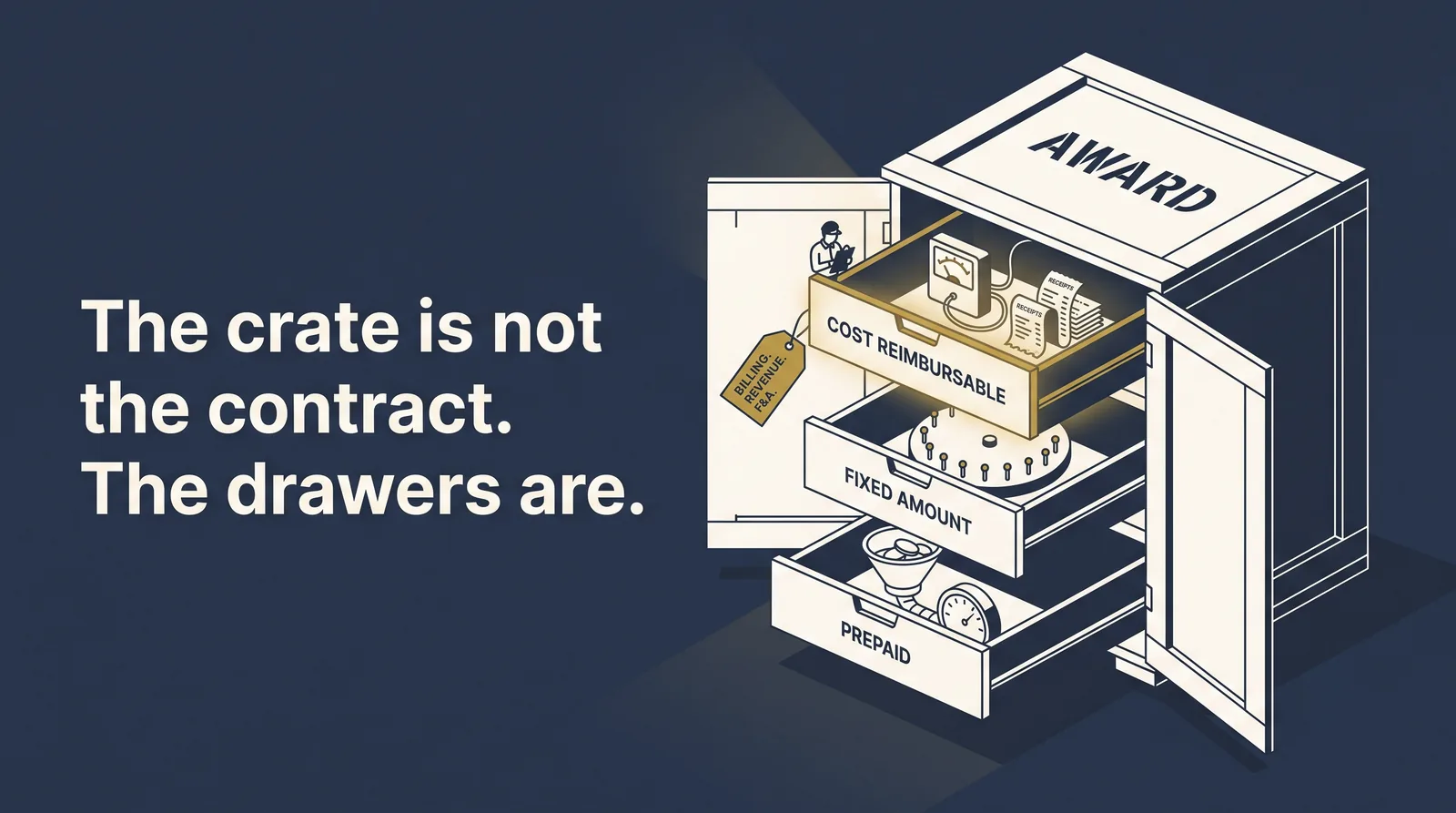
An award is the versioned contract with the sponsor. It holds one or more award lines, and the attributes on the line drive costing, revenue recognition and how you bill the sponsor. The header doesn't. Three line types set everything downstream.

Cost reimbursable
Bills off actual posted expense and recognizes revenue as cost is incurred.
Fixed amount
Bills on an installment schedule.
Prepaid
Takes a sponsor advance and tracks the balance down.

Pick the wrong line type and you've locked in the wrong revenue timing for the life of the award. Unwinding it means amendments.

The grant itself is the FDM worktag that carries the money and the accounting. A single grant can sit in more than one hierarchy at once, a department rollup and a sponsored-programs rollup, so the college and the research office each get the view they need.

Closeout has teeth. Once an award line moves to closeout in progress, Workday blocks new expense from posting. That's what you want. It also strands a late invoice on unrestricted funds if departments weren't trained on the cutoff.

An award drawn as a shipping crate with three drawers open: cost reimbursable, fixed amount, and prepaid, each holding a different billing mechanism
One award, three line types, three ways to bill.
Requirement
Make the award line type a sponsored-programs decision with a review step. A setup analyst shouldn't be picking it from a default. It's the one choice that fixes billing and revenue for the whole award.

GRT 130

Indirect cost and F&A: where the money leaks

The engine is only as good as the base you give it.

Prerequisite
GRT 110, GRT 120
Offered
Before go-live

Facilities and Administrative recovery (F&A, Workday's term for indirect cost) is governed by federal cost principles. Workday calculates and posts it automatically off the award line's rate agreement.

Indirect cost is charged as a percentage of Modified Total Direct Cost, and that base leaves out seven kinds of cost. If equipment, tuition remission, patient care or the first-$25,000-per-subaward rule aren't flagged as non-overhead-bearing, Workday burdens them with F&A and over-bills the sponsor. It's a classic exception.

The money at stake is real. Universities recover only 25 to 30% of a project's total cost through their negotiated rate, and they reported a $6.8 billion under-recovery of indirect cost in a single year. A misconfigured base makes a thin recovery thinner.

Left out of the baseThe four to test before go-live
  1. Capital equipment
  2. Participant support
  3. Patient care
  4. Rental of space
  5. Scholarships and fellowships
  6. Tuition remission
  7. Each subaward's portion over $25,000
Requirement
Test the F&A base against real award data before go-live. Run equipment, tuition remission, patient care and an over-$25,000 subaward through the engine and confirm each one is excluded. It's a 2-hour test that prevents a multi-year billing exception.

GRT 140

Seam one: grants to Financials

There's no nightly reconciliation between grants and the ledger, so the posting rules have to do that job.

Prerequisite
GRT 110
Offered
From go-live on
Also listed in
Financials

Users never pick a ledger account. They pick worktags, and the account posting rule set maps the grant worktag bundle to the ledger behind the scenes. Because the grant shares the FDM with core Financials, sponsor billing, receivables, deferred revenue and revenue recognition all run natively on the award. There's no separate subledger to interface every night.

The benefit is that a whole class of interface-reconciliation failures goes away. The cost is that a bad rule-set entry posts with no error. On a real go-live, salary-cap transactions posted to grant-related funds when they should have gone to an institutional fund. That posting-rule defect took an exception report and a mass correction to fix. No user could have fixed it.

Requirement
Change-control the posting rule set, and watch sponsored funds with a standing fund-mismatch exception report.
Case study
No interface means no safety net. The teams that came from a bolt-on grants system kept looking for the nightly reconciliation between grants and the general ledger. There isn't one, because there isn't a separate grants ledger. The posting rules are the reconciliation. Treat them like a financial control for as long as the system runs.

GRT 150

Seam two: grants to HCM and Payroll, the audit seam

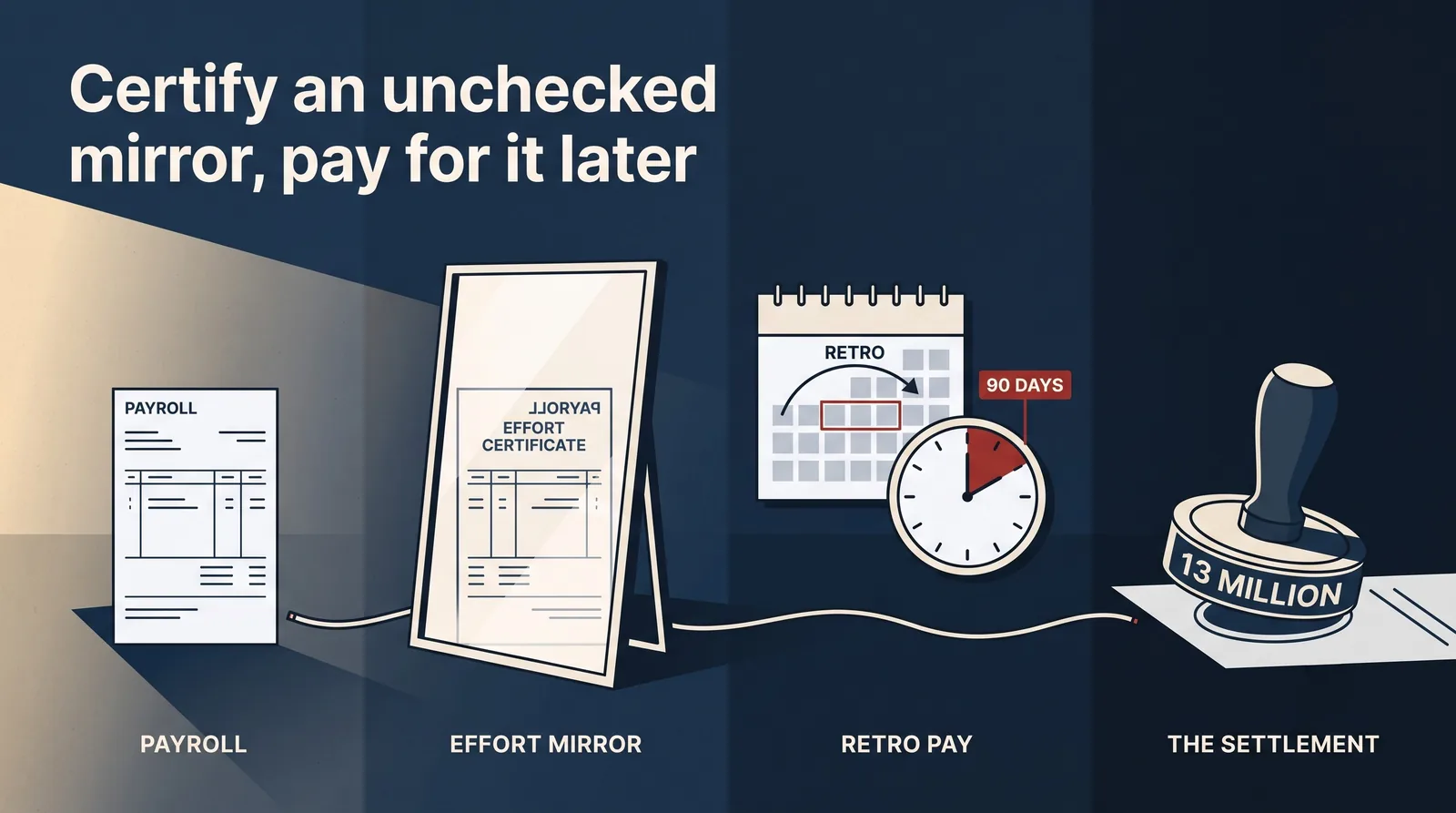
The effort statement is only a mirror of payroll. Check the mirror before anyone certifies it.

Prerequisite
GRT 120
Offered
Before each certification window
Also listed in
HCM, Payroll

Salary is the largest cost on most awards. It flows from HCM appointments through payroll costing onto grant worktags, and effort certification is generated from that payroll distribution. The control object is the Payroll Costing Allocation: which grants a worker's salary charges, in what proportion, with effective dates. For an NIH award, Workday auto-splits pay above the salary cap onto a cost-share fund. If actual effort differs from the payroll distribution, commonly by more than a 5% institutional tolerance, the department has to run a Payroll Accounting Adjustment to move the charge before it can certify.

One institution's own published defect notes show where it breaks. Retro pay posts to the current costing allocation instead of the one in effect for the retro period, which undercharges the grants that should have carried the cost. The salary-cap engine misfires on non-standard pay. Mixing up the correction tools (a Payroll Accounting Adjustment versus a funding transfer) creates a second problem on top of the first.

Late cost transfers are the number-one audit theme. Auditors hold you to the 90-day standard, and "staff shortages" is explicitly an unallowable justification for a late transfer. A slow award-setup backlog after go-live manufactures exactly those late transfers. The consequence is on the record: one health science center paid $13 million to settle a False Claims Act case rooted in inaccurate effort tracking and inadequate internal controls.

The effort statement is a mirror of payroll: retro pay overshoots to the wrong month, the 90-day cost-transfer clock runs out, and the chain ends at a 13 million dollar settlement stamp
Payroll, the effort statement, retro pay, the settlement. Certify the mirror without checking it and payroll's errors go straight through to the end of the chain.

"We are concerned about the potential for unanticipated costs, lost opportunities, audit risks and compliance violations."

A public research university's Office of Research, writing to its own principal investigators about its own system, 3 months after go-live.
Requirement
Don't trust the effort statement as generated. Before you open the certification window, run payroll-costing-versus-actual and salary-cap exception reports, clear the adjustments, and standardize the correction tool by defect type. Certification should confirm a reconciliation that already happened. It shouldn't be the first time anyone corrects payroll.

GRT 160

Foundation gifts and sponsored grants

Same money in, opposite accounting. Draw the line while the FDM is still being designed.

Prerequisite
GRT 110
Offered
Phase 0, during FDM design

At research institutions and academic medical centers, money arrives two ways that look similar and behave in opposite ways. A gift is a donation with no performance obligation, and contribution revenue is recognized when the unconditional promise is made. A sponsored grant carries a performance obligation. When it's conditional or a reimbursement, revenue is recognized only as it's earned, often only after the expense is incurred, and unearned money goes back to the sponsor.

They take different worktags, different funds and different revenue rules. Model them the same way and both restricted-fund reporting and revenue recognition break.

Foundation gift and sponsored grant compared
Foundation giftDonor, unconditionalSponsored grantGovernment or foundation, with a program
Performance obligationNoneYes: deliverables and compliance
Revenue recognizedWhen the promise is madeAs earned, often after the expense posts
Unspent moneyStays, subject to donor intentReturned to the sponsor
WorktagGift driverGrant driver
Requirement
Model gifts and sponsored grants as separate worktags and funds from the start of FDM design.
Case study
The line went into the design. On a health-system finance build, the team drew the gift-versus-grant line during FDM design because the two recognize revenue on opposite principles. Foundation gifts were unconditional transfers. Sponsored grants, most of them research, carried conditions and reimbursement mechanics, so revenue couldn't be recognized until it was earned. Drawing that line up front kept restricted-fund reporting clean. Institutions that find the distinction during year-end close spend the close reclassifying revenue.

Department of

Student Systems

Workday Student spans six areas: admissions, curriculum and the academic foundation, student records, advising, student financials and financial aid. Institutions replace a student system once in 20 to 25 years, so almost nobody inside has done it before.

STU 210 A four-course sequence, STU 211 to 214

Student deploys in waves because the academic calendar says so

A sequence of switches thrown as the academic calendar needs them, usually across several years.

Prerequisite
CORE 101
Offered
Term by term

The foundation layer supports everything else, so it goes first. Then records and registration, then student financials, then aid, each lit up as the term needs it. The reasons are structural. The annual clock means every institution needs the same windows at once, and the scope is enormous. You can't register students before the catalog exists or bill them before they register.

Taken in order
  1. STU 211FoundationRequires nothing before it

    Academic structure, programs, calendars and eligibility. Everything else in Student stands on this layer.

  2. STU 212Records and registrationRequires STU 211

    The catalog, registration and grades. Prove registration on a real term before anything else goes live.

  3. STU 213Student financialsRequires STU 212

    Billing, tuition and refunds. Students have to be registered before you can bill them.

  4. STU 214Financial aidRequires STU 213 and an aid build that's readyHeld until aid is ready

    Where timelines slip. Packaging, disbursement and Title IV. Give aid its own go/no-go so it can move a term without moving records and registration.

Requirement
Sequence Student go-lives to the academic calendar, whatever the project milestone chart says. Light up the academic foundation and records first, prove registration on a real term, and hold financial aid until it's ready. Forcing a term boundary before you're ready is how a slip becomes a crisis.
One library with two wings: the legacy SIS holds prior terms in cool blue while Workday holds new terms in gold, and a floor chute sends historical records to a basement archive
One student record, two systems, split by term.

STU 220

Switching the student system of record has no quiet weekend

Expect to keep the legacy system alive for historical corrections for years.

Prerequisite
STU 210
Offered
Term by term, with the cutline set early

Switching the system of record off a legacy Student Information System (SIS) is a phased handoff, one term at a time. The legacy SIS stays the system of record for prior terms while Workday becomes the system of record for new terms. A single student's record is split across two systems by term, with a formal coexistence period where both run live.

Historical conversion is selective by design. Institutions convert active students and a few years of history, migrate a defined historical academic record, and leave classes of legacy data out of Workday entirely, served instead from a data platform.

The active-versus-historical cutline is a real decision, usually enrolled now or within the prior few years, and it drives conversion volume and cost. Financial aid is the repeat offender. One university pushed its go-live a full year at the aid checkpoint, after roughly $14 million and two and a half years, because its aid rules were more complex than the plan assumed. Another kept its legacy aid engine running alongside Workday.

Registration is where hidden policy complexity surfaces first. That's why the institutions that did well ran a full mock registration term before going live.

Requirement
Define the active-versus-historical cutline early and plan to serve historical records from a data platform instead of converting everything. Treat financial aid as its own milestone with its own go/no-go, so it can slip without moving records and registration. Never let aid drag the whole go-live past a term boundary.

STU 230

Seam three: Student to Financials

Tuition, fees, aid, waivers and refunds post on their own. Whether they post correctly comes down to one worktag.

Prerequisite
STU 213
Offered
Before go-live
Also listed in
Financials, Grants Management

Tuition, fees, aid disbursements, waivers and refunds post to the general ledger automatically. A revenue category worktag is required on every revenue line, and it drives the ledger account. Get the mapping wrong and you've got a compliance problem. At one institution, tuition and fees charged to sponsored awards posted as scholarships at go-live, a classification that didn't comply with federal and institutional grant rules.

Auto-posting doesn't make the books tie by themselves. The student receivable subledger still has to tie to the ledger control account, and misconfigured charge, waiver or refund rules make the two diverge and stall the close.

Requirement
Govern the revenue category catalog jointly across Student Financials, Sponsored Programs and the Controller before go-live, and test the sponsored-tuition path on its own.

STU 240

Seam four: Student to HCM and reporting

One person, one record, many roles. A change shows up everywhere at once.

Prerequisite
STU 210, GRT 150
Offered
Before go-live
Also listed in
HCM, institutional reporting

A student who works in the library, a grad student on a research appointment and a faculty member who advises are each one Workday record with multiple roles. Nobody stitches duplicate records together with an interface. The payoff and the risk are the same fact: a change is visible everywhere immediately. A role or status collision, such as an HR termination that disagrees with an enrollment, corrupts payroll and enrollment reporting at once.

Faculty appointment data in HCM also drives PI eligibility and effort, so this seam compounds the one in GRT 150. Institutional reporting forces the join. A single IPEDS submission pulls enrollment, human resources and finance from one model, so census dates have to be defined the same way across Student, HCM and Finance or the counts won't tie.

Requirement
Stand up a person-data governance body that owns the shared-record rules: source of truth per attribute, duplicate prevention and role lifecycle. In a one-record model that's a data-integrity control. Define census dates once, jointly across Student, HCM and Finance.

CAP 300 Capstone

The published retrospectives converge on governance

The rest of the ERP is a known quantity. None of the public failures in Grants and Student were really about the software.

Prerequisite
Every course above
Offered
At the go-live gate and the weeks after

ERP in higher education can't be run as just an IT project. Success turns on change management and staffing. The institutions that recovered or avoided the crisis did five things.

  1. They treated grants configuration as its own workstream and validated award lines, F&A exclusions, the salary-cap split and the effort loop with real data, beyond the headers.

  2. They staffed for the award-setup surge after go-live. At the hardest go-live, the single most damaging grants failure was a months-long setup backlog that froze research spending and manufactured late cost transfers.

  3. They kept faculty able to see their own grant balances. A PI who can't see burn rate can't manage the award.

  4. They caught readiness at the go-live gate instead of pushing through it. One large university paused its student cutover days before the first release when campus wasn't ready, and ran the next terms on the legacy system.

  5. They set the expectation that go-live is the start of stabilization, with dashboards and a real faculty escalation path for the weeks after.

Degree audit before go-live

Two questions predict the outcome. Can a PI see their own grant balance on day one? Is there a staffed plan for the award-setup surge in the first 90 days? If either answer is no, you're buying an audit finding.

Red flags that fail the audit, and what satisfies each one
CourseFails the auditSatisfied when
CORE 101Grants and Student tested last, folded into Finance and HR.Each is its own workstream with its own go/no-go.
GRT 110Grant worktags designed after configuration starts.The grant and gift worktags are designed in Phase 0, before any award.
GRT 130The F&A base assumed correct because the engine runs.The base exclusions are tested against real award data.
GRT 150Effort certified straight off an unchecked payroll mirror.Effort is reconciled to payroll before certification opens.
STU 214Financial aid dragging the whole student go-live.Aid is its own milestone and can slip on its own.
STU 220Trying to convert every historical student record.The active-versus-historical cutline is set early.
CAP 300No plan for the award-setup surge after go-live.The first 90 days are staffed. A backlog manufactures late transfers.
CAP 300PIs can't see their own grant balances on day one.Self-service grant visibility is proven before anyone calls it ready.

Land the two modules that decide the program

Design the grant worktags before you configure an award. Prove the F&A base and the effort loop with real data. Sequence Student to the calendar and let aid slip on its own. Keep faculty able to see their money, and staff the surge that follows go-live.

Further reading Finance ERP modules, HCM and HR modules, Payroll modules and Data conversion and integrations. See also The cutover playbook.

Sources. External guidance draws on public Workday higher-education datasheets, federal cost principles (2 CFR 200) and NIH salary-cap guidance, EDUCAUSE ECAR research, NCES IPEDS documentation, and public university offices and retrospectives (including Georgia Tech, Minnesota, Washington, Montgomery College, UVA, WashU, UBC, Dickinson, Miami and Michigan State), plus a US Department of Justice effort-reporting settlement. Field examples come from real, fully anonymized higher-education and academic medical center implementations. This is general guidance. It isn't legal, accounting or federal-compliance advice.

Free toolkit

Score your grants and student build across 10 areas.

A readiness checklist across all 10 areas, from the FDM and F&A base to the student system-of-record cutover, plus a pitfall-by-area quick reference: the common trap, the better move and why it matters. Keep it beside the design and the go/no-go.

Let's talk

Put independent eyes on your grants and student build.

If you're standing up Workday Grants or Student, a candid review of the FDM, the effort seam and the aid plan before go-live is the cheapest insurance you'll buy.